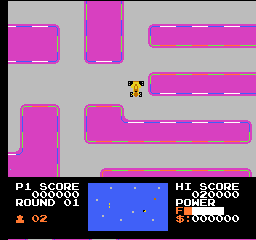
Jovial Race (Unl)
Inside Jovial Race (Unl)
Jovial Race (Unl) is an unlicensed racing game for the Nintendo Entertainment System. While details about its developer are not widely documented, it falls within the genre of racing games that were popular during the NES era. Unlicensed titles like this one often emerged from independent developers looking to capitalize on the gaming market without the backing of major publishers.
In Jovial Race, players navigate through various racing tracks, aiming to outpace their opponents. The gameplay mechanics typically involve speed management and maneuvering through obstacles, which is standard for racing titles of this time. Players may find themselves engaged in a competitive racing experience, attempting to secure the fastest times and best placements in races.
Today, Jovial Race holds a certain charm for retro gaming enthusiasts, particularly those interested in the history of unlicensed titles. While it may not be as polished as mainstream releases, it offers a glimpse into the creativity and experimentation of the era. Fans of classic racing games might appreciate its nostalgic appeal, even if it remains a niche entry in the vast library of NES games.
How to Play Jovial Race (Unl) Online
Getting started with Jovial Race involves selecting your racer and choosing a track. The core loop revolves around competing against other racers while managing your speed and navigating the course. As you race, be mindful of obstacles and other competitors, as they can affect your performance.
Familiarize yourself with the controls to maximize your racing efficiency. The game may feature unique mechanics that differentiate it from other racing titles, so take the time to practice and figure out the best strategies for each track. Since the game is unlicensed, it may not have extensive documentation, but exploration and experimentation will enhance your experience.
Jovial Race (Unl) Keyboard Controls
Controls
- Arrow Keys — D-Pad / Movement
- X — A button (jump / confirm)
- S — B button (run / attack / cancel)
- Enter — Start / Pause
- V — Select




Comments (0)