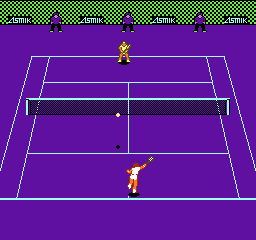
Four Players' Tennis (Europe)
Four Players' Tennis (Europe) on NES
Four Players' Tennis is a sports game released for the Nintendo Entertainment System in Europe. This title is notable for its multiplayer capabilities, allowing up to four players to compete in tennis matches. While details about the developer and publisher are not widely documented, the game fits within the genre of sports titles that were popular during the NES era.
In Four Players' Tennis, players engage in tennis matches using simple controls. The gameplay revolves around serving, volleying, and scoring points against opponents. The game emphasizes multiplayer competition, which was a common feature in many sports games of the time, encouraging social play among friends and family.
Today, Four Players' Tennis holds a niche appeal, especially for those who enjoy retro sports games. While it may not be as polished or feature-rich as other sports games from its era, it offers a fun way to experience tennis with friends. The simplicity of its mechanics makes it accessible, and it can be a great addition to any retro gaming collection, particularly for fans of the NES platform.
How to Play Four Players' Tennis (Europe) Online
To get started in Four Players' Tennis, you first need to set up a match. Choose the number of players and select the court type, which can add some variety to your experience. The game is designed to be played with friends, so gathering a group can enhance the enjoyment as you compete against each other.
The core gameplay loop involves serving the ball, returning shots, and trying to outscore your opponents. Timing and positioning are crucial, as you need to anticipate your opponent's moves. Familiarizing yourself with the controls will help you react quickly during matches. The simplicity of the game makes it easy to pick up, but mastering it will require practice and skill.
Four Players' Tennis (Europe) Keyboard Controls
Controls
- Arrow Keys — D-Pad / Movement
- X — A button (jump / confirm)
- S — B button (run / attack / cancel)
- Enter — Start / Pause
- V — Select





Comments (0)