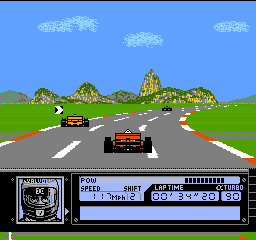
Al Unser Jr. Turbo Racing (USA)
About Al Unser Jr. Turbo Racing (USA)
Al Unser Jr. Turbo Racing for the Nintendo Entertainment System was released in the early 1990s, a time when NES development was transitioning toward more advanced 16-bit consoles. The specific development team behind this title is not widely documented, which is common for many licensed racing games on the NES. Development during this era often involved small teams working with tight technical constraints such as limited memory and processing power, which influenced game design and graphical fidelity.
The gameplay attempts to deliver an arcade-style racing experience featuring the famous IndyCar driver Al Unser Jr. Players navigate turbo-charged vehicles through various race tracks, focusing on speed and control. The game tries to balance accessibility for casual players while offering some challenge through track layouts and car handling, though it remains grounded in the relatively simple mechanics typical of NES racing games.
While the game provides a straightforward racing experience, it does not stand out significantly among its peers and may feel dated when compared to later racing titles. The limited graphics and sound capabilities of the NES platform constrain the overall immersion. Nevertheless, it holds nostalgic value for fans of early 90s racing games and those interested in licensed sports titles on the NES, offering a glimpse into the era's approach to racing gameplay.
How to Play Al Unser Jr. Turbo Racing (USA) Online
To get started with Al Unser Jr. Turbo Racing, players select a race track and choose their vehicle before hitting the starting line. The objective is to complete laps as quickly as possible while avoiding obstacles and maintaining control through tight turns. The game emphasizes timing and precision, so familiarizing yourself with the handling of your car is key during your first session. Expect a straightforward racing challenge typical of NES titles, with a focus on improving lap times and mastering each course.
When playing, focus on smooth steering through corners to maintain speed, as sudden movements can cause loss of control. Using the turbo function strategically on straightaways can help gain an edge. These tips align with the era’s racing games where precision and timing often outweigh aggressive driving.
Al Unser Jr. Turbo Racing (USA) Keyboard Controls
Controls
- Arrow Keys — D-Pad / Movement
- X — A button (jump / confirm)
- S — B button (run / attack / cancel)
- Enter — Start / Pause
- V — Select


Comments (0)