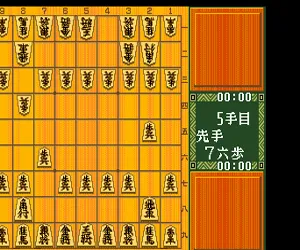
The game loads when you press Play · press “Play Now” inside the game if it asks.
Shougi Shoshinsha Muyou (Japan)
Shougi Shoshinsha Muyou
Shougi Shoshinsha Muyou on TG16
- NEC TURBOGRAFX-16
- Board Game
- 5· 0 votes
Shougi Shoshinsha Muyou is a Japanese board game released for the NEC TurboGrafx-16 (known as the PC Engine in Japan) sometime in the early 1990s. As the title suggests - it roughly translates to "Shogi for Beginners Not Allowed" - this is a simulation of shogi, the classic Japanese chess variant. The exact developer and publisher remain undocumented in most English sources, but the game was a commercial release exclusive to Japan, fitting into a small niche of strategy titles on the platform.
The player takes the side of one player in a standard game of shogi, facing off against a computer opponent. Shogi is played on a 9x9 board with pieces that each move in specific patterns, much like international chess. The key difference is the drop rule: captured enemy pieces can be returned to the board as your own, which makes the game more dynamic. The player selects moves using the D-pad and buttons, navigating a cursor across the board. Menus and prompts are entirely in Japanese, so familiarity with shogi notation or basic menu navigation helps.
For shogi enthusiasts, this is one of the few officially licensed shogi games on the TurboGrafx-16, making it a rare find. It doesn't offer flashy graphics or sound - it's a straightforward digital board with pieces represented by kanji characters. If you enjoy abstract strategy or want to practice shogi without a physical set, this title is worth a look. Just be ready to interpret Japanese menus and the drop rule if you are new to the game.
GAME INFO
- Platform
- NEC TURBOGRAFX-16
- Genre
- Board Game
- Players
- 1
- Region
- Japan
How to play Shougi Shoshinsha Muyou online
Getting Started
When you launch Shougi Shoshinsha Muyou, you are greeted by a title screen in Japanese. Press Start (Enter) to proceed. The main menu will present options like starting a new game or changing difficulty. Use the D-pad to highlight and the A button (X) to confirm. Since all text is in Japanese, experiment with the menu order - usually "New Game" is the first option.
The core gameplay is a standard shogi match. You control the bottom side of the board (sente) or the top side depending on the setting. Your goal is to checkmate the opponent's king by using your pieces (king, gold general, silver general, knight, lance, pawn, etc.) and capturing their pieces to drop later. Use the D-pad to move the cursor to a piece you want to move, press A to select it, then move to the destination and press A again. Captured pieces go to your hand (displayed on screen) and can be dropped on empty squares by selecting the hand piece and then a square.
The computer opponent reacts quickly, so think ahead. If you are unfamiliar with shogi, look up the basic movement patterns before diving in. The game does not have a tutorial; it assumes you already know the rules. Play a few matches against easier opponents (if the option exists) to get a feel for the interface.
CONTROLS
Controls
- Arrow Keys: D-Pad / Movement
- X: I button
- S: II button
- Enter: Run / Start
- V: Select
Shougi Shoshinsha Muyou FAQ
Is there anything iconic or memorable about Shougi Shoshinsha Muyou?
Its title is a playful warning: "Shogi for Beginners Not Allowed" suggests it was designed with experienced players in mind. The rarity of shogi games on the TurboGrafx-16 also makes it a unique item for collectors.
Is Shougi Shoshinsha Muyou exclusive to NEC TURBOGRAFX-16 or did it appear on other systems?
This game appears to have been released only for the PC Engine / TurboGrafx-16 in Japan. It was not ported to any other platform.
Does Shougi Shoshinsha Muyou have a multiplayer or co-op mode?
No multiplayer or co-op mode is included. The game is strictly single-player versus a computer opponent.
You may also like
All NEC TURBOGRAFX-16 games











GAME INFO
- Platform
- NEC TURBOGRAFX-16
- Genre
- Board Game
- Players
- 1
- Region
- Japan
COMMENTS (0)
No comments yet. Be the first to share your thoughts.