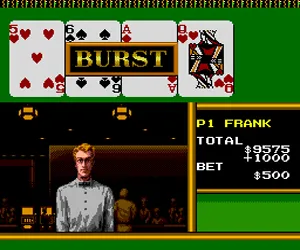
King of Casino (Japan)
King of Casino (Japan) Overview
King of Casino (Japan) is a compilation of five classic gambling games released for the NEC TurboGrafx-16. It landed exclusively in Japan during the early 1990s, targeting the home console market with a mix of popular casino staples. While the exact publisher and developer are not widely documented, the game was part of a wave of simulation-style roms that sought to bring the casino experience into living rooms via the TurboGrafx-16's 8-bit hardware.
At its core, King of Casino lets you choose from roulette, poker, blackjack, keno, and slots. You start with a bankroll of virtual credits and pick a game from the menu. Each minigame follows standard real-world rules: bet on red or black in roulette, try to beat the dealer in blackjack, play five-card draw poker, pick numbers in keno, or pull the lever on slot machines. Wins add credits to your pool, losses reduce it, and the goal is to build as large a bankroll as possible before running out of funds. The interface is menu-driven, and all text is in Japanese, so some trial and error may be needed to navigate the options.
Today, King of Casino stands as a niche curiosity for retro collectors and gambling enthusiasts. It is not a deep or visually impressive title - the graphics are simple and the sound is basic - but it offers a functional set of casino games in one package. For fans of the TurboGrafx-16 who enjoy exploring the system's lesser-known imports, this provides a snapshot of how gambling sims were adapted to early 90s console hardware. It lacks the flash of arcade hits but holds its own as a straightforward, playable compilation. If you enjoy digital card and table games from that era, it is worth a spin.
How to Play King of Casino (Japan) Online
King of Casino is a Japanese-only release, so menus and in-game text are in Japanese. When you start, you will likely see a title screen followed by a menu listing the five games: roulette, poker, blackjack, keno, and slots. Use the D-Pad to highlight an option and press the A button (X key) to select it. If you get stuck, try cycling through options with the D-Pad and pressing A to advance.
Once you pick a game, you begin with a set number of credits. For table games like blackjack or poker, you use the D-Pad to make decisions like hit, stand, or bet. The B button (S key) often acts as a cancel or back function. In slot machines, a single button pull spins the reels. The core loop involves choosing a game, placing bets, playing rounds, and watching your credits rise or fall. There is no overarching story - just the goal of amassing as many credits as possible before losing them all.
Because the interface is entirely in Japanese, new players may want to experiment by pressing buttons to see what happens. Pay attention to recurring symbols - a credit counter is usually at the top or bottom of the screen. If you accidentally exit a game, pressing Start (Enter key) might pause or open a menu. Take your time to learn the layout; once you memorize the position of each game in the main menu, navigation becomes straightforward.
King of Casino (Japan) Keyboard Controls
Controls
- Arrow Keys: D-Pad / Movement
- X: I button
- S: II button
- Enter: Run / Start
- V: Select
Comments (0)