Dungeon Explorer (Japan)
Inside Dungeon Explorer (Japan)
Dungeon Explorer is an action role-playing game that originally came out for the NEC TurboGrafx-16 in Japan on March 4, 1989. It was developed by Atlus and published by Hudson Soft, with a North American release following later that year from NEC. This is the first entry in the Dungeon Explorer series, and it was co-directed by Kazutoshi Ueda and Yōsuke Niino, working with much of the same team that would go on to create other notable titles. It's a top-down dungeon crawler that blends real-time combat with character progression, all set in the fantasy land of Oddesia.
How to Play Dungeon Explorer (Japan) Online
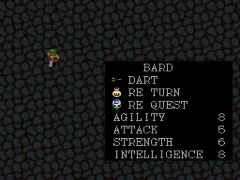
The Japanese version of Dungeon Explorer uses menus entirely in Japanese, so knowing a few basic characters can help. When you start, you'll pick one of eight characters, each with different stats and starting equipment. Your goal is to explore the dungeons of Oddesia, fighting aliens and collecting the pieces of the Ora stone to defeat the alien king Natas.
Movement is with the D-Pad, and you attack using the B button (S key). The A button (X key) is used to jump over obstacles or confirm selections. As you defeat enemies, you gain experience and level up, which increases your attack, defense, and magic abilities. You can find new weapons, armor, and items in chests or from shopkeepers scattered through the dungeons. The game supports up to five players simultaneously if you have a multitap, but you can play solo just fine.
The core loop involves moving from floor to floor in each dungeon, clearing rooms of foes, and finding keys to open doors to progress. Save points are limited, so you'll need to manage your resources carefully. If you're new to the series, start with a balanced character like the Fighter or Elf to learn the rhythm of combat and exploration. The Japanese text in the menu can be navigated by trial and error because each option usually leads to equipment, items, or the next area once you get the hang of it.
Dungeon Explorer (Japan) Keyboard Controls
Controls
- Arrow Keys: D-Pad / Movement
- X: I button
- S: II button
- Enter: Run / Start
- V: Select




Comments (0)