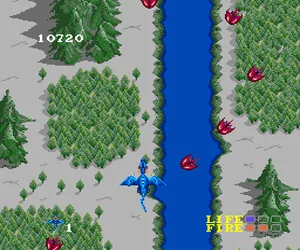
Dragon Spirit (Japan)
Dragon Spirit (Japan) Overview
Dragon Spirit arrived on the NEC TurboGrafx-16 as a port of Namco's classic 1987 arcade shoot-em-up. In Japan it was released for the PC Engine in 1988, bringing a vertically scrolling dragon-based shooter to home consoles. Namco handled development and publishing, and this version stayed faithful to the original's core formula.
You control a dragon flying upward through scrolling stages, firing fireballs at airborne and ground enemies. The dragon can transform into a stronger blue form after collecting certain power-ups, gaining more firepower and a second head for wider coverage. Each level ends with a boss fight that requires pattern recognition, and your health is measured by a life bar rather than instant death from one hit.
For fans of classic shoot-em-ups, Dragon Spirit offers a unique twist with its dragon theme and power-up system. It's not as fast-paced as some contemporaries, but the gradual difficulty curve and multiple paths through stages give it lasting appeal. The TurboGrafx-16 version holds up well and is a solid pick for anyone curious about Namco's arcade ports on the system.
How to Play Dragon Spirit (Japan) Online
Getting Started
When the game boots, you will see a Japanese title screen. Press Start to begin. Your dragon automatically fires in the direction you move - hold the attack button (S) for rapid fire if you want steady shots. The first level is straightforward; just dodge enemy bullets and collect blue orbs to power up your dragon. Losing all your health brings up a continue screen - you have a limited number of continues, so make each life count.
The core loop is simple: fly upward, destroy everything, grab power-ups, and beat the stage boss. Pay attention to the dragon's form: the default green dragon can take two hits before losing a life, while the blue dragon (after collecting two magic orbs) has enhanced firepower and an extra head. Watch for the occasional fairy item that grants temporary invincibility - it can save you in tight spots.
If you are playing the Japanese version, note that all menus are in Japanese. The main menu options are Start Game and Continue - the first option is the one you want. There is no language toggle. The game has no save feature, so you must play through in one session or use the emulator's save state function.
Dragon Spirit (Japan) Keyboard Controls
Controls
- Arrow Keys: D-Pad / Movement
- X: I button
- S: II button
- Enter: Run / Start
- V: Select



Comments (0)