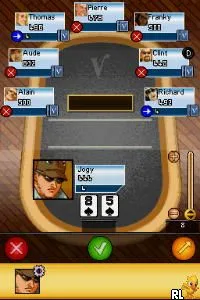
Veronica Poker (Netherlands)
Getting to Know Veronica Poker (Netherlands)
Veronica Poker (Netherlands) is a poker-themed game released for the Nintendo DS. It is notable for its niche appeal, targeting fans of card games and poker enthusiasts. While specific details about its developer and publisher are not widely documented, the game fits within the casual gaming genre popular on handheld platforms during the mid-2000s.
In Veronica Poker, players engage in various poker games, likely adhering to standard poker rules and mechanics. The gameplay primarily revolves around making strategic decisions based on the cards dealt, betting, and bluffing, which are core elements of poker. As with many card games on the DS, the touch screen likely enhances the experience, allowing for quick navigation of menus and actions.
This title may not stand out among the vast array of Nintendo DS offerings, but it serves a specific audience that enjoys card games. Compared to more action-oriented titles of its time, Veronica Poker offers a slower-paced, strategic experience. Its simplicity and focus on poker mechanics might appeal to those looking for a casual gaming session, especially in a retro context where card games were often overshadowed by more complex titles.
How to Play Veronica Poker (Netherlands) Online
To get started in Veronica Poker, first select the type of poker game you want to play from the main menu. Once you've made your selection, you will be prompted to place your bets and receive your cards. Familiarize yourself with the rules of the specific poker variant being played, as this will guide your strategy.
The core loop involves assessing your hand, making strategic decisions about betting, and engaging with other players or AI opponents. Pay attention to your opponents' actions, as bluffing and reading their behavior can be crucial to winning. Remember, patience and strategy are key in poker, so take your time to make decisions based on your cards and the game state.
Veronica Poker (Netherlands) Keyboard Controls
Controls
- Arrow Keys — D-Pad / Movement
- X — A button
- S — B button
- Z — Y button
- A — X button
- Q — L shoulder
- E — R shoulder
- Enter — Start
- V — Select
Comments (0)