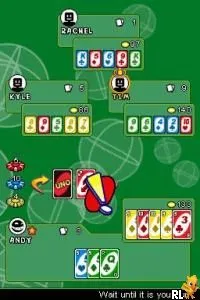
Uno 52 (Europe) (En,Fr,De,Es,It)
Uno 52 (Europe) (En,Fr,De,Es,It) - Board Game Classic
Uno 52 (Europe) (En,Fr,De,Es,It) is a localized version of the classic card game Uno, released for the Nintendo DS. This title combines the beloved mechanics of the original game with the convenience of handheld gaming. While the exact development team behind this specific version isn't widely documented, it remains a popular choice among fans of board games adapted for consoles.
In Uno 52, players engage in the traditional card game format, where the objective is to be the first to play all your cards. The game employs standard Uno rules, which include matching colors and numbers while utilizing special action cards to change the flow of the game. The DS version allows for both single-player and multiplayer modes, making it a versatile option for casual gaming sessions.
For those revisiting this title today, Uno 52 offers a nostalgic experience that captures the essence of the original card game. While it may not be as complex or layered as some modern games, its simplicity and accessibility make it a great choice for quick, fun gameplay. Compared to other board game adaptations on the DS, it holds a unique charm that appeals to both new players and those fond of classic card games.
How to Play Uno 52 (Europe) (En,Fr,De,Es,It) Online
Getting Started: To begin playing Uno 52, start by selecting a game mode. You can choose to play solo against AI or join friends for a multiplayer experience. Familiarize yourself with the card types and their functions as you set up your game.
The core loop involves drawing cards, playing them by matching colors or numbers, and using special cards strategically to disrupt opponents. Pay attention to the actions of other players and anticipate their moves as you aim to be the first to empty your hand. Remember, yelling 'Uno' when you have one card left is essential to avoid penalties!
Uno 52 (Europe) (En,Fr,De,Es,It) Keyboard Controls
Controls
- Arrow Keys — D-Pad / Movement
- X — A button
- S — B button
- Z — Y button
- A — X button
- Q — L shoulder
- E — R shoulder
- Enter — Start
- V — Select
Comments (0)