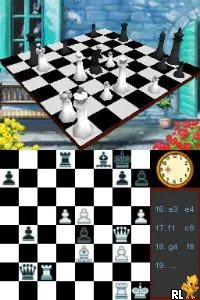
Schach (Germany) (En,De)
Schach (Germany) (En,De) on NDS
Schach (Germany) (En,De) is a chess simulation game released for the Nintendo DS. It is primarily targeted at German-speaking audiences and features both English and German language options. As a strategy board game, it allows players to engage in chess matches using the unique capabilities of the DS, a platform well-known for its touch screen and dual display functionality.
In this game, players take on the role of chess participants, competing against either AI opponents or other players. The mechanics revolve around traditional chess rules, where each player strategically moves their pieces on an 8x8 board to capture the opponent's king. The touch screen interface enables intuitive piece movement, making it accessible for both seasoned chess players and newcomers alike.
As a chess title on the DS, Schach offers a straightforward yet engaging experience for fans of the genre. While it may not have the depth or complexity found in more extensive chess simulations, it serves as an excellent introduction to the game for casual players. Its simplistic nature and bilingual options make it a niche title worth exploring for those interested in chess, especially within the retro gaming community.
How to Play Schach (Germany) (En,De) Online
To get started in Schach, select your desired game mode, whether playing against the AI or a friend. Once in the game, you will see the chessboard on the touch screen, where you can move your pieces by tapping and dragging them. Familiarity with chess rules will enhance your experience, as the core loop involves capturing your opponent's pieces while protecting your own.
As you play, keep an eye on the strategic positioning of your pieces. Each type of chess piece has its unique movement capabilities, so understanding these mechanics will be crucial for success. The game allows for practice matches, giving you the chance to improve your skills before challenging tougher opponents.
Schach (Germany) (En,De) Keyboard Controls
Controls
- Arrow Keys — D-Pad / Movement
- X — A button
- S — B button
- Z — Y button
- A — X button
- Q — L shoulder
- E — R shoulder
- Enter — Start
- V — Select
Comments (0)