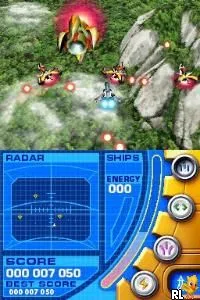
Nanostray (Europe) (En,Fr,De)
Inside Nanostray (Europe) (En,Fr,De)
Nanostray is a shoot 'em up game developed for the Nintendo DS, released in Europe. This title, which supports multiple languages including English, French, and German, is notable for its engaging gameplay and vibrant graphics. It falls into the action genre and was released during a time when handheld consoles were becoming increasingly popular, showcasing the capabilities of the DS platform.
In Nanostray, players pilot a spaceship through a series of levels filled with enemy ships and challenging bosses. The gameplay centers around dodging incoming fire and shooting down enemies while collecting power-ups to enhance your spacecraft's capabilities. The controls are intuitive, taking advantage of the DS's dual screens and stylus, allowing for a dynamic gaming experience that was quite appealing for its time.
Today, Nanostray holds a special place in the library of Nintendo DS games due to its solid mechanics and appealing visuals. While it may not be as widely recognized as some of its contemporaries, it offers a satisfying challenge for fans of the shoot 'em up genre. Its straightforward gameplay and well-designed levels make it a worthwhile title for players looking to explore the DS's diverse game offerings.
How to Play Nanostray (Europe) (En,Fr,De) Online
To get started with Nanostray, first select your game mode from the main menu. You can choose from various options, including single-player missions and other challenges. Once you start a mission, your primary goal is to navigate through levels while eliminating enemies and avoiding their attacks.
As you play, focus on collecting power-ups to improve your ship's weapons and defenses. Mastering the controls is key, as you will need to maneuver quickly to dodge enemy fire while simultaneously targeting foes. The core loop involves progressing through increasingly difficult stages, culminating in boss battles that require strategy and skill to overcome.
Nanostray (Europe) (En,Fr,De) Keyboard Controls
Controls
- Arrow Keys — D-Pad / Movement
- X — A button
- S — B button
- Z — Y button
- A — X button
- Q — L shoulder
- E — R shoulder
- Enter — Start
- V — Select
Comments (0)