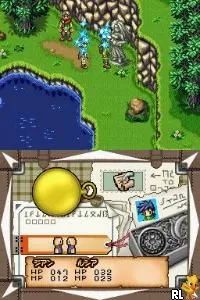
Lunar - Genesis (Japan)
Lunar - Genesis (Japan) Overview
Lunar - Genesis is the Japanese version of what North American players know as Lunar: Dragon Song, a role-playing game released for the Nintendo DS in 2005. Developed by Game Arts and published by Marvelous Interactive, it was intended as a new entry in the long-running Lunar series. Unlike the earlier console games that were turn-based, this DS installment mixes traditional RPG exploration with some real-time elements in battle, and it remains one of the few Lunar titles on a handheld.
As an RPG, you control the main character Jian and travel through a fantasy world. The core loop involves talking to townsfolk, accepting quests, and venturing into dungeons where random encounters trigger turn-based fights. One unique mechanic is that you can choose an auto-battle mode for random battles to speed things up. The bottom screen displays a map and menu options, while the top screen shows the main action. Experience points and leveling up work as expected, and your party grows as the story progresses.
For Lunar fans, this entry is interesting because it was the last original Lunar game for many years. It does have a mixed reputation due to its departure from some series conventions - like replacing traditional shops with a loot system - but it is still a solid DS RPG with charming sprite work and a full story. If you can read Japanese or use a guide, it is worth a playthrough to see what the series attempted on the DS. Otherwise, the English version is more accessible.
How to Play Lunar - Genesis (Japan) Online
Getting Started
When you begin Lunar - Genesis, you will first see a title screen with Japanese text. Press Enter (Start) to proceed. The game will present a save slot selection - choose an empty slot by pressing X (A button). After that, a short movie plays, and you land in your home town of Burg. Control starts in Jian's house; talk to the child NPCs by standing near them and pressing X. To leave, head to the door and press X. Outside, use the D-Pad to explore.
The main goal early on is to talk to the village elder and then head to the nearby forest north of town to find a 'Crystal of Light'. Movement is on the D-Pad, and while exploring the overworld you will encounter enemies randomly. When a battle starts, you can select commands from a menu using the D-Pad and X to confirm. The bottom screen shows a map; you can tap it with the mouse (if using emulator) but keyboard navigation works fine. Keep an eye on HP and use healing items from your item menu by pressing Z (Y button) or navigating the menu.
Since this is the Japanese version, all menus are in Japanese. If you do not read Japanese, you may want to use a translation guide. The interface is standard RPG fare: there are options for Fight, Magic, Items, and Run (逃げる). To save, find a church building in towns and talk to the woman at the counter. The game uses a battery-backed save so your progress is kept. Experiment with the controls and enjoy the classic Lunar atmosphere.
Lunar - Genesis (Japan) Keyboard Controls
Controls
- Arrow Keys: D-Pad / Movement
- X: A button
- S: B button
- Z: Y button
- A: X button
- Q: L shoulder
- E: R shoulder
- Enter: Start
- V: Select




Comments (0)