Luminous Arc 2 (Europe)
Inside Luminous Arc 2 (Europe)
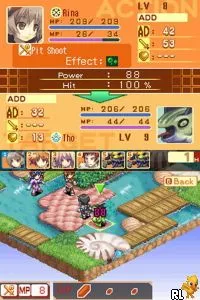
Luminous Arc 2 was released for the Nintendo DS in Europe, building on the success of its predecessor. Developed by Imageepoch, this tactical RPG offers players strategic gameplay intertwined with a fantasy narrative. The game is known for its engaging mechanics and charming character designs, typical of the genre during that period.
Players engage in turn-based battles, utilizing a grid-based map system to position their characters and execute attacks. The game emphasizes tactical planning, where each character has unique abilities and roles within the party. Players can also interact with various NPCs and explore the game's world, which is filled with quests and lore that enhance the overall experience.
This title is worth trying for those who appreciate tactical RPGs and the unique charm of the Nintendo DS library. While it may not be as widely recognized as some of its contemporaries, Luminous Arc 2 offers a solid gameplay experience with its focus on strategy and character development. Fans of the genre will find it a delightful addition to their collection, especially for its nostalgic value and engaging mechanics.
How to Play Luminous Arc 2 (Europe) Online
Getting started in Luminous Arc 2 involves selecting a save file and diving into the story. The initial gameplay loop consists of navigating the world map, interacting with characters, and engaging in turn-based battles. Familiarize yourself with the character abilities and the strengths of your party to tackle the challenges ahead.
As you progress, pay attention to the dialogue and story elements, as they often provide context for your missions. The game encourages strategic thinking, so positioning your characters wisely during battles is crucial. Exploring the world and completing side quests can also enhance your characters' abilities, making them more effective in combat.
Luminous Arc 2 (Europe) Keyboard Controls
Controls
- Arrow Keys — D-Pad / Movement
- X — A button
- S — B button
- Z — Y button
- A — X button
- Q — L shoulder
- E — R shoulder
- Enter — Start
- V — Select

Comments (0)