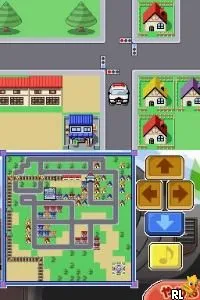
Kids DS - Dekita yo! Mama. - Otokonoko (Japan)
What is Kids DS - Dekita yo! Mama. - Otokonoko (Japan)?
Kids DS - Dekita yo! Mama. - Otokonoko is a Japanese title for the Nintendo DS that falls within the educational genre. It was released exclusively in Japan, catering to a younger audience with an emphasis on learning through gameplay. The game is relatively niche and not widely documented, making it a lesser-known entry in the DS library.
In this game, players engage in various mini-games designed to teach and entertain. The mechanics typically involve simple tasks that require quick thinking and dexterity, which is common for educational games of the era. While the specifics of the mini-games are not extensively documented, they generally promote interaction and skill development, making them suitable for children.
Despite its limited exposure outside Japan, the game holds a certain charm for collectors and retro gaming enthusiasts. It reflects the educational trends of the Nintendo DS platform, which often sought to blend fun with learning. While it may not have the broad appeal of bigger titles, it serves as a unique artifact of its time, showcasing the platform's diverse library aimed at younger players.
How to Play Kids DS - Dekita yo! Mama. - Otokonoko (Japan) Online
To get started with Kids DS - Dekita yo! Mama. - Otokonoko, begin by selecting a mini-game from the main menu. Since the game is primarily in Japanese, familiarize yourself with the basic layout of the menus to navigate effectively. Each mini-game has its own objectives, so take some time to understand the instructions before diving in.
The core gameplay loop involves completing various tasks that challenge your reflexes and problem-solving skills. You'll typically repeat these mini-games to improve your score and skills. As you play, pay attention to any in-game tips that may help you perform better. This educational approach ensures that players not only have fun but also learn in the process.
Kids DS - Dekita yo! Mama. - Otokonoko (Japan) Keyboard Controls
Controls
- Arrow Keys — D-Pad / Movement
- X — A button
- S — B button
- Z — Y button
- A — X button
- Q — L shoulder
- E — R shoulder
- Enter — Start
- V — Select

Comments (0)