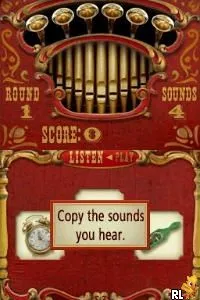
I Spy Fun House (Europe)
I Spy Fun House (Europe): NDS Educational
I Spy Fun House (Europe) is an educational game released for the Nintendo DS. Developed as part of the I Spy series, this title focuses on interactive puzzles and hidden object gameplay. While the exact developer is not widely documented, this game fits within the platform's genre conventions, appealing to younger audiences looking for engaging learning experiences.
In I Spy Fun House, players explore various colorful environments filled with items to find. The gameplay revolves around solving riddles and locating objects based on visual clues. This structure encourages critical thinking and sharpens observational skills, making it suitable for players looking to improve their cognitive abilities while having fun.
This title holds a special place in the Nintendo DS library as a family-friendly option. While it may not be the most complex game, it offers a nostalgic value for those who enjoyed similar educational titles during the platform's era. Compared to other games, I Spy Fun House provides a unique blend of entertainment and learning, making it worth a try for fans of the genre or parents looking for engaging content for their children.
How to Play I Spy Fun House (Europe) Online
To get started in I Spy Fun House, choose a game mode and familiarize yourself with the interface. The core loop involves exploring different rooms, where you'll be presented with riddles that guide you to find specific items. Pay attention to the clues, as they will help you locate the hidden objects scattered throughout the vibrant environments.
As you progress, the puzzles may become more challenging, requiring keen observation and quick thinking. Take your time to enjoy the whimsical art style and engaging sound design. Remember, this game is designed to be accessible for younger players, so don't hesitate to explore and experiment with different strategies to find each item efficiently.
I Spy Fun House (Europe) Keyboard Controls
Controls
- Arrow Keys — D-Pad / Movement
- X — A button
- S — B button
- Z — Y button
- A — X button
- Q — L shoulder
- E — R shoulder
- Enter — Start
- V — Select

Comments (0)