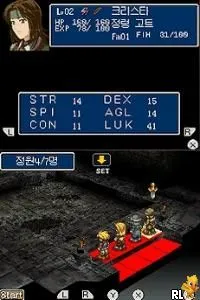
Hoshigami (Korea)
Hoshigami (Korea) Overview
Hoshigami (Korea) is a tactical role-playing game released for the Nintendo DS. It is a localized version of a game originally developed in Japan, focusing on strategic battles and character development. Known for its intricate gameplay mechanics, it caters to fans of the RPG genre and was released during the era when the DS was gaining popularity for its diverse library of games.
In Hoshigami, players engage in turn-based combat, commanding a team of characters across grid-based battlefields. The game emphasizes strategy, requiring players to think critically about positioning and abilities to defeat enemies. Players will navigate through various scenarios, managing resources and character relationships, which adds depth to the gameplay experience.
This title is worth exploring today for its unique blend of tactical combat and RPG elements, especially for those who enjoy games that challenge their strategic thinking. While it may not be as well-known as other RPGs from the era, its niche appeal lies in its mechanics and the way it encourages thoughtful play. Fans of tactical RPGs will find Hoshigami a hidden gem that showcases the strengths of the genre during the Nintendo DS's lifespan.
How to Play Hoshigami (Korea) Online
Getting started in Hoshigami involves selecting your characters and understanding their abilities before engaging in battles. The game begins with an introductory scenario that sets the stage for the tactical challenges ahead. Players should familiarize themselves with the menu layout, which may be in Japanese, but basic navigation through options is generally intuitive.
The core loop revolves around preparing for battles, executing strategies during combat, and managing your team's growth. Pay attention to character stats and their interactions, as these can significantly influence the outcome of battles. This strategic depth requires players to plan ahead and adapt their tactics to overcome various challenges presented in the game.
Hoshigami (Korea) Keyboard Controls
Controls
- Arrow Keys — D-Pad / Movement
- X — A button
- S — B button
- Z — Y button
- A — X button
- Q — L shoulder
- E — R shoulder
- Enter — Start
- V — Select

Comments (0)