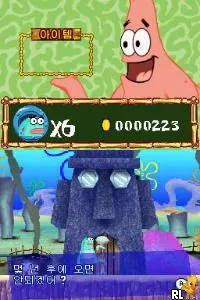
Geuryeora, Touch! - SpongeBob Nemobaji (Korea)
Geuryeora, Touch! - SpongeBob Nemobaji (Korea) - Action Classic
Geuryeora, Touch! - SpongeBob Nemobaji is a game for the Nintendo DS that was released in South Korea. This title falls into the action genre and is known for being a relatively niche entry in the broader SpongeBob game franchise. The specifics about the developers and publishers are not widely documented, making it a unique find for collectors and fans of retro gaming.
In this game, players engage in various mini-games that utilize the DS's touch screen capabilities. The gameplay often revolves around quick reflexes and timing, as players navigate through challenges that are reminiscent of other action titles of the era. While the exact mechanics may vary, the focus is on engaging with the touch interface to complete tasks and achieve high scores.
Today, Geuryeora, Touch! - SpongeBob Nemobaji is worth exploring for those interested in the DS's library of lesser-known titles. It offers a light-hearted experience that may appeal to fans of SpongeBob and casual gaming. Compared to similar games from that time, it stands out for its unique use of touch controls, even if it doesn’t reach the heights of more prominent titles in the franchise.
How to Play Geuryeora, Touch! - SpongeBob Nemobaji (Korea) Online
Getting started in Geuryeora, Touch! - SpongeBob Nemobaji involves selecting a mini-game from the main menu. Each mini-game has different objectives, so it’s important to pay attention to the instructions that appear at the beginning. Players will use the stylus to interact with the screen, which is central to the gameplay experience.
The core loop consists of completing these mini-games to earn points and unlock additional content. As players progress, they may encounter more challenging tasks that require quick thinking and dexterity. Familiarity with the touch mechanics is key, and players should practice to improve their performance in each mini-game.
Geuryeora, Touch! - SpongeBob Nemobaji (Korea) Keyboard Controls
Controls
- Arrow Keys — D-Pad / Movement
- X — A button
- S — B button
- Z — Y button
- A — X button
- Q — L shoulder
- E — R shoulder
- Enter — Start
- V — Select






Comments (0)