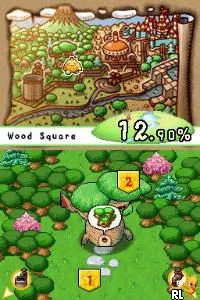
Ecolis - Save the Forest (Europe) (En,Fr,De,Es,It)
Ecolis - Save the Forest (Europe) (En,Fr,De,Es,It) Overview
Ecolis - Save the Forest is a Nintendo DS title that falls into the educational genre, aimed at raising awareness about environmental issues. Released in Europe, this game is notable for its multi-language support, offering gameplay in English, French, German, Spanish, and Italian. While not widely documented, it is likely part of a growing trend during the DS era that sought to blend gaming with educational content, making it a unique entry in the platform's library.
In Ecolis, players engage in various activities centered around saving forests and understanding environmental conservation. The gameplay revolves around completing tasks that involve planting trees, cleaning up pollution, and educating characters about the importance of nature. These mechanics not only provide entertainment but also convey valuable lessons about ecology and sustainability, which was a common theme in educational games of the time.
This title is worth exploring today for those interested in retro games that blend fun with learning. While it may not boast the same level of action or complexity found in mainstream titles, Ecolis serves as a gentle reminder of the importance of environmental stewardship. Its educational focus sets it apart from many other games of its era, which often leaned heavily on combat or puzzle-solving, making it a niche but valuable addition to any retro gaming collection.
How to Play Ecolis - Save the Forest (Europe) (En,Fr,De,Es,It) Online
To get started in Ecolis - Save the Forest, begin by selecting your preferred language from the main menu. The game will then introduce you to various challenges focused on environmental conservation. As you progress, you will find yourself completing tasks that involve planting trees and cleaning the environment, which are central to the gameplay loop.
Ecolis - Save the Forest (Europe) (En,Fr,De,Es,It) Keyboard Controls
Controls
- Arrow Keys — D-Pad / Movement
- X — A button
- S — B button
- Z — Y button
- A — X button
- Q — L shoulder
- E — R shoulder
- Enter — Start
- V — Select

Comments (0)