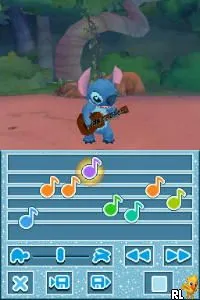
Disney Friends (Italy)
Disney Friends (Italy) on NDS
Disney Friends (Italy) is a title for the Nintendo DS that offers a unique blend of gameplay centered around beloved Disney characters. Released in the mid-2000s, this game falls into the educational genre and is aimed primarily at a younger audience. While specific development details are sparse, it reflects the era's trend of leveraging popular franchises for engaging gameplay experiences.
In Disney Friends, players interact with a variety of Disney characters through mini-games and activities that promote skills and creativity. The gameplay typically involves simple tasks that are easy to grasp, making it accessible for children. Players can expect to engage in a series of challenges that often revolve around problem-solving and exploration, which aligns with the educational focus of the title.
This game is worth trying today, especially for those interested in retro titles aimed at younger audiences. While it may not possess the depth of some contemporaneous games, its charm lies in its simplicity and recognizable characters. Compared to other educational titles from the DS era, Disney Friends offers a light-hearted approach, perfect for casual play sessions, especially for fans of Disney's animated universe.
How to Play Disney Friends (Italy) Online
Getting started with Disney Friends involves selecting a character and diving into various mini-games. Each game offers a unique challenge, often revolving around puzzles or tasks designed to engage younger players. As you progress, new activities become available, encouraging exploration and skill development.
The core loop typically consists of completing mini-games to earn rewards, which can unlock new content or enhance your experience. Players should pay attention to the instructions provided in each mini-game, as they often contain essential tips for success. Familiarizing yourself with the controls will also help in navigating the various challenges effectively.
Disney Friends (Italy) Keyboard Controls
Controls
- Arrow Keys — D-Pad / Movement
- X — A button
- S — B button
- Z — Y button
- A — X button
- Q — L shoulder
- E — R shoulder
- Enter — Start
- V — Select

Comments (0)