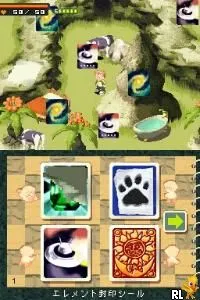
Contact (Japan)
What is Contact (Japan)?
Contact (Japan) is a Nintendo DS title developed by Grasshopper Manufacture and released in Japan. It's an action RPG that offers a unique blend of exploration, combat, and quirky humor. The game is known for its unconventional gameplay mechanics and engaging narrative, making it a distinctive entry in the DS library.
In Contact, players control a young boy who embarks on an adventure filled with whimsical characters and challenging foes. The gameplay emphasizes exploration and interaction with the environment, allowing players to engage in battles using various abilities. The game features a real-time combat system and employs a unique mechanic where players can collect items and use them strategically during encounters.
This title is worth trying today for its charm and creativity, particularly for fans of indie-style games. While it may not have the widespread recognition of major franchises, its blend of humor and innovative gameplay make it stand out. Players who appreciate unique storytelling and unconventional mechanics will find Contact a refreshing experience, especially within the context of the DS's diverse library.
How to Play Contact (Japan) Online
Getting started in Contact involves navigating through the game's introductory sections, where you meet key characters and learn the basic mechanics. Since the game is in Japanese, players might need to familiarize themselves with basic navigation and menu options early on. The core loop revolves around exploring various environments, engaging in battles, and completing quests to progress the story.
As you play, focus on collecting items and utilizing them effectively during battles. The game encourages experimentation with different strategies, so don't hesitate to try out various abilities and items. Understanding the combat system and how to manage your inventory will be crucial for success, especially as you encounter tougher enemies later in the game.
Contact (Japan) Keyboard Controls
Controls
- Arrow Keys — D-Pad / Movement
- X — A button
- S — B button
- Z — Y button
- A — X button
- Q — L shoulder
- E — R shoulder
- Enter — Start
- V — Select

Comments (0)