Contact (Europe) (En,Fr,De,Es,It)
What is Contact (Europe) (En,Fr,De,Es,It)?
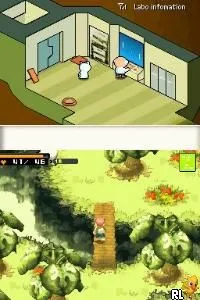
Contact (Europe) (En,Fr,De,Es,It) is a unique role-playing game developed by Grasshopper Manufacture and released for the Nintendo DS. It came out in Europe in 2007, following its original release in Japan. The game is known for its quirky style and innovative gameplay mechanics, which incorporate elements of traditional RPGs with a modern twist, making it an interesting entry in the DS library.
In Contact, players assume the role of a young boy who embarks on an adventure after meeting a mysterious alien. The gameplay involves exploring various environments, engaging in battles, and solving puzzles. Combat is real-time and features a unique mechanic where players can influence the direction of their attacks and abilities. Players will also interact with a variety of characters and utilize the DS's touchscreen to manage inventory and abilities, adding depth to the overall experience.
This title is worth trying today due to its distinctive blend of humor and gameplay. While it may not reach the same level of popularity as other RPGs on the platform, such as Pokémon or Final Fantasy, it offers a refreshing change of pace with its offbeat charm. The game appeals to both retro gaming enthusiasts and newcomers looking for something different, making it a hidden gem in the Nintendo DS collection.
How to Play Contact (Europe) (En,Fr,De,Es,It) Online
Getting started in Contact involves familiarizing yourself with the game's mechanics and controls. Begin by exploring the initial area and talking to characters to gather information and quests. The core loop revolves around questing, battling enemies, and discovering new areas, with an emphasis on character interaction and story progression.
As you progress, pay attention to the unique abilities of your character and how they can be used in combat. Experiment with different strategies in battles, utilizing the touchscreen for inventory and abilities. Keep an eye out for items and upgrades, as they will enhance your experience and make challenges more manageable.
Contact (Europe) (En,Fr,De,Es,It) Keyboard Controls
Controls
- Arrow Keys — D-Pad / Movement
- X — A button
- S — B button
- Z — Y button
- A — X button
- Q — L shoulder
- E — R shoulder
- Enter — Start
- V — Select
Comments (0)