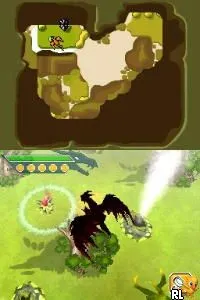
Combat of Giants - Dragons (Europe) (En,Fr,De,Es,It,Nl,Sv,No,Da)
Combat of Giants - Dragons (Europe) (En,Fr,De,Es,It,Nl,Sv,No,Da) on NDS
Combat of Giants - Dragons is an action game released for the Nintendo DS in Europe. Developed by Ubisoft, this title allows players to engage in battles with dragons. It showcases the genre conventions typical of its time, emphasizing combat and creature management on a handheld platform.
In this game, players take on the role of a dragon, engaging in one-on-one battles with various opponents. The mechanics revolve around using elemental powers and strategic moves to defeat foes, with an emphasis on timing and skill. Players can also customize their dragons, enhancing their abilities and appearances, which adds depth to the gameplay experience.
Today, Combat of Giants - Dragons serves as a nostalgic trip for those fond of creature-based combat games. While it may not have the same level of recognition as other Nintendo DS titles, it offers a unique blend of action and customization. Fans of similar games from this era will appreciate its straightforward mechanics and the charm of battling as a dragon, making it worth a try for retro enthusiasts.
How to Play Combat of Giants - Dragons (Europe) (En,Fr,De,Es,It,Nl,Sv,No,Da) Online
Getting started in Combat of Giants - Dragons involves selecting your dragon and preparing for battle. Players will navigate through menus to choose the dragon's abilities and customize its appearance. The core gameplay loop consists of battling other dragons in various environments, focusing on mastering elemental attacks and strategic moves.
As you progress, learning the strengths and weaknesses of different dragons becomes crucial. Pay attention to the elemental matchups, as they can significantly impact the outcome of battles. Familiarize yourself with the controls to execute attacks effectively and counter your opponents' moves, ensuring a more enjoyable experience.
Combat of Giants - Dragons (Europe) (En,Fr,De,Es,It,Nl,Sv,No,Da) Keyboard Controls
Controls
- Arrow Keys — D-Pad / Movement
- X — A button
- S — B button
- Z — Y button
- A — X button
- Q — L shoulder
- E — R shoulder
- Enter — Start
- V — Select






Comments (0)