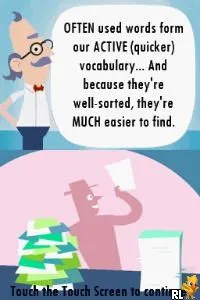
Classic Word Games (Europe) (NDSi Enhanced)
Getting to Know Classic Word Games (Europe) (NDSi Enhanced)
Classic Word Games (Europe) (NDSi Enhanced) is a compilation of various word puzzle games designed for the Nintendo DS platform. Released in Europe, this title offers a nostalgic nod to fans of word games, featuring a variety of puzzles that challenge vocabulary and spelling skills. While specific developer details are scarce, it fits into the educational genre, which was popular during the DS era, targeting casual gamers and word enthusiasts alike.
In Classic Word Games, players engage in a series of word-based puzzles that test their linguistic abilities. The gameplay typically involves solving crosswords, word searches, and other word-related challenges. Each puzzle offers a different way to interact with the language, encouraging players to think critically and expand their vocabulary while having fun. The touch screen functionality of the DS allows for a more interactive experience, making it easy to select letters and input answers.
This title holds a certain charm for those who appreciate word games and the simplicity they bring. While it may not have the depth or complexity of some other DS titles, its straightforward gameplay makes it an accessible choice for players of all ages. Compared to similar games from its era, Classic Word Games offers a solid collection of puzzles that can be enjoyed in short bursts, making it a great addition to any retro gaming library for those looking to enjoy classic word challenges.
How to Play Classic Word Games (Europe) (NDSi Enhanced) Online
To get started with Classic Word Games, choose a puzzle type from the main menu. Each option presents a unique challenge, whether it’s a crossword or a word search. Familiarize yourself with the controls, as selecting letters and navigating the puzzles will be essential to making progress.
The core loop revolves around solving puzzles by filling in words or finding hidden ones within a grid. Pay attention to any clues provided, as they guide you toward the correct answers. As you complete puzzles, you may unlock additional challenges or levels, keeping the gameplay fresh and engaging. Don’t hesitate to experiment with different strategies for tackling the puzzles.
Classic Word Games (Europe) (NDSi Enhanced) Keyboard Controls
Controls
- Arrow Keys — D-Pad / Movement
- X — A button
- S — B button
- Z — Y button
- A — X button
- Q — L shoulder
- E — R shoulder
- Enter — Start
- V — Select

Comments (0)