Catz (Japan)
What is Catz (Japan)?
Catz (Japan) is a life simulation game for the Nintendo DS that was released exclusively in Japan. Developed by the team behind the popular pet simulation franchise, this title allows players to interact with and care for virtual cats. As part of the broader trend of pet simulation games during the mid-2000s, it offers a unique experience tailored to cat lovers.
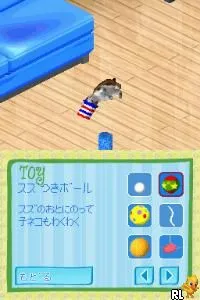
In this game, players take on the role of a cat owner, engaging in various activities that revolve around taking care of their feline companions. You can feed, groom, and play with your cats, simulating the responsibilities of pet ownership. The gameplay is structured around daily routines and tasks, providing a casual and relaxed atmosphere that encourages exploration and interaction with your cats.
Catz holds a niche position in the realm of simulation games on the DS. While it may not have the same widespread recognition as other titles, it captures the charm of pet care in a way that resonates with fans of the genre. Its simple mechanics and focus on cat companionship make it a delightful experience for those who appreciate virtual pets, especially in an era when such games were becoming increasingly popular.
How to Play Catz (Japan) Online
To get started in Catz, first, you will need to navigate the menus, which are in Japanese. Familiarize yourself with the basic commands to care for your virtual cats. Once in the game, you can choose a cat to adopt and begin your daily routines. The core loop involves feeding, grooming, and playing with your cats, ensuring they are happy and healthy.
As you progress, you may unlock additional activities or items that enhance your gameplay experience. Pay attention to your cats' needs and preferences, as each one may have unique traits. Engaging with them regularly will deepen your bond and lead to a more fulfilling experience in this charming simulation.
Catz (Japan) Keyboard Controls
Controls
- Arrow Keys — D-Pad / Movement
- X — A button
- S — B button
- Z — Y button
- A — X button
- Q — L shoulder
- E — R shoulder
- Enter — Start
- V — Select






Comments (0)