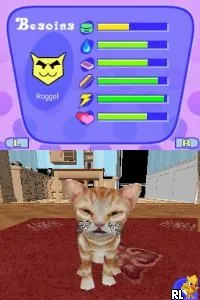
Catz 2 (Europe) (En,Fr,De,Es,It,Nl,Sv,No,Da)
Catz 2 (Europe) (En,Fr,De,Es,It,Nl,Sv,No,Da) on NDS
Catz 2 (Europe) (En,Fr,De,Es,It,Nl,Sv,No,Da) is a life simulation game developed for the Nintendo DS platform, released in Europe. This title is part of the Catz series, which allows players to adopt and care for virtual cats in a variety of environments. The game is notable for its colorful graphics and interactive gameplay, appealing to younger audiences and pet lovers alike.
In Catz 2, players engage in activities centered around caring for their virtual feline companions. You can feed, groom, and play with your cats, as well as train them to perform tricks. The game encourages exploration and interaction, allowing players to create a personalized experience through various mini-games and activities that enhance the bond with their pets.
This title is worth trying today for those who enjoy casual simulation games or have a fondness for pets. While it may not have the depth of more complex titles, Catz 2 offers a charming experience that reflects the pet simulation genre's conventions during the Nintendo DS era. It provides a light-hearted escape that can be enjoyable for both nostalgic players and newcomers looking for a simple yet engaging game.
How to Play Catz 2 (Europe) (En,Fr,De,Es,It,Nl,Sv,No,Da) Online
To get started in Catz 2, you’ll first need to create your cat by selecting its appearance and name. Once your cat is ready, the game introduces you to various environments where you can interact with your new pet. The core gameplay revolves around caring for your cat, which includes feeding, grooming, and playing with it to keep it happy and healthy.
As you progress, you can unlock different activities and mini-games that allow you to train your cat and explore more of the game world. It's essential to pay attention to your cat's needs, as a well-cared-for pet will respond better and may even learn new tricks. The engaging mechanics and simple controls make it accessible for players of all ages.
Catz 2 (Europe) (En,Fr,De,Es,It,Nl,Sv,No,Da) Keyboard Controls
Controls
- Arrow Keys — D-Pad / Movement
- X — A button
- S — B button
- Z — Y button
- A — X button
- Q — L shoulder
- E — R shoulder
- Enter — Start
- V — Select






Comments (0)