Blue Dragon Plus (Europe) (En,Fr,De,Es,It)
Inside Blue Dragon Plus (Europe) (En,Fr,De,Es,It)
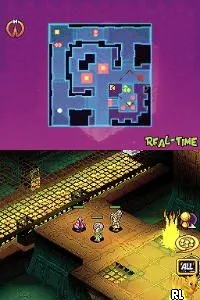
Blue Dragon Plus is a tactical role-playing game released for the Nintendo DS in Europe. Developed by Mistwalker and published by Microsoft Game Studios, it serves as a sequel to the original Blue Dragon game. The game features a blend of strategy and RPG elements, catering to fans of both genres and showcasing the capabilities of the Nintendo DS platform.
In Blue Dragon Plus, players engage in real-time battles while commanding a party of characters. The gameplay combines traditional RPG mechanics with strategic elements, allowing players to position their units on a grid-based battlefield. Players can level up their characters, customize their abilities, and utilize various tactics to overcome challenges and enemies throughout the game.
This title is worth exploring for its unique blend of RPG and strategy, especially for fans of the original Blue Dragon. While it may not be as widely recognized as other RPGs of its era, it offers a charming experience with engaging gameplay mechanics. The game holds a special place in the Nintendo DS library, appealing to those who appreciate tactical gameplay and the aesthetic of classic RPGs.
How to Play Blue Dragon Plus (Europe) (En,Fr,De,Es,It) Online
Getting started in Blue Dragon Plus involves selecting your characters and understanding the battle mechanics. Initially, players will choose their party members and set their skills, which is crucial for success in combat. The core loop revolves around engaging enemies, strategizing unit placement, and utilizing character abilities effectively.
As you progress, it’s important to focus on leveling up your characters and developing their skills. Battles occur on a grid, and positioning is key to maximizing your effectiveness in encounters. Pay attention to enemy types and adapt your strategies accordingly, as each battle requires careful planning to emerge victorious.
Blue Dragon Plus (Europe) (En,Fr,De,Es,It) Keyboard Controls
Controls
- Arrow Keys — D-Pad / Movement
- X — A button
- S — B button
- Z — Y button
- A — X button
- Q — L shoulder
- E — R shoulder
- Enter — Start
- V — Select

Comments (0)