Bee Movie Game (Netherlands)
Inside Bee Movie Game (Netherlands)
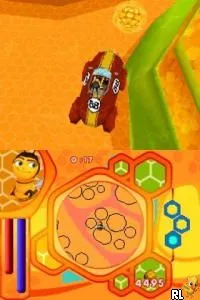
Bee Movie Game for the Nintendo DS is an action-adventure title released in the Netherlands. Based on the animated film of the same name, it was developed by Beenox and published by Activision. This game allows players to engage with the quirky world of bees, exploring various environments inspired by the movie while navigating through different challenges.
In the game, players take on the role of Barry B. Benson, a bee who embarks on multiple missions. The gameplay consists of a mix of platforming elements and mini-games, where players can fly around, collect items, and complete various tasks. The controls are straightforward, making it accessible for younger audiences, while the vibrant graphics and engaging sound design contribute to the overall experience.
Today, Bee Movie Game holds a niche appeal, especially for fans of the film or those interested in retro gaming. While it may not have the same depth as other titles from its era, it offers a light-hearted and entertaining experience. Its straightforward mechanics and charming aesthetics make it worth a try for those looking to relive a bit of animated nostalgia on the Nintendo DS.
How to Play Bee Movie Game (Netherlands) Online
To get started with Bee Movie Game, first select your game mode from the main menu. Once you begin, you'll control Barry B. Benson as you navigate through various missions that involve collecting items and completing tasks. Pay attention to the objectives given at the start of each level, as they guide your actions.
The core loop involves flying around different environments, tackling mini-games, and interacting with other characters. Collecting honeycomb pieces is essential, as they help you progress through the game. Familiarize yourself with the controls early on, as they will help you maneuver effectively during challenging segments.
Bee Movie Game (Netherlands) Keyboard Controls
Controls
- Arrow Keys — D-Pad / Movement
- X — A button
- S — B button
- Z — Y button
- A — X button
- Q — L shoulder
- E — R shoulder
- Enter — Start
- V — Select






Comments (0)