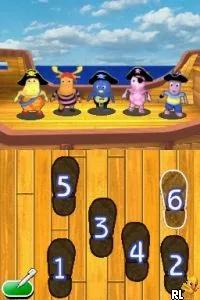
Backyardigans, The (Europe)
About Backyardigans, The (Europe)
Backyardigans, The (Europe) is a Nintendo DS title that brings to life the vibrant world of the popular children's television show. Released in Europe, this game is designed for young players and falls under the educational genre. It focuses on engaging children through interactive gameplay, allowing them to explore and enjoy the characters they love from the series.
In the game, players join the Backyardigans on various adventures filled with music and imaginative play. Players engage in mini-games that involve solving puzzles, participating in musical challenges, and exploring different environments. The gameplay encourages creativity and problem-solving, which is a hallmark of educational titles aimed at children, making it accessible and fun.
Today, Backyardigans, The is a charming piece of nostalgia for fans of the show and a gentle introduction to gaming for younger players. While it may not have the depth of more complex titles from its era, it offers a unique blend of entertainment and education. For those looking to share a simple, fun gaming experience with children or relive the early 2000s era of family-friendly games, this title is worth exploring.
How to Play Backyardigans, The (Europe) Online
Getting started with Backyardigans, The is quite straightforward. Upon launching the game, players are typically greeted with a menu where they can choose their adventure. The core loop involves engaging in various mini-games that align with the show's themes, which often revolve around teamwork and creativity.
As players progress, they will encounter different scenarios that challenge their problem-solving skills. It's important to explore each environment fully, as hidden items and opportunities for interaction often enhance the gameplay experience. Players should take their time to enjoy the colorful graphics and cheerful music, which are integral to the charm of this title.
Backyardigans, The (Europe) Keyboard Controls
Controls
- Arrow Keys — D-Pad / Movement
- X — A button
- S — B button
- Z — Y button
- A — X button
- Q — L shoulder
- E — R shoulder
- Enter — Start
- V — Select

Comments (0)