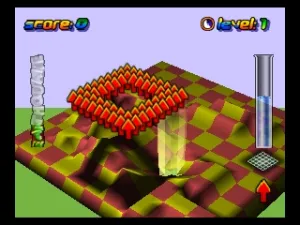
Wetrix (Europe) (En,Fr,De,Es,It,Nl)
Wetrix (Europe) (En,Fr,De,Es,It,Nl): N64 Puzzle
Wetrix is a unique puzzle game released for the Nintendo 64 in Europe. Developed by Zed Two and published by Nintendo, it combines elements of strategy and simulation in a colorful, engaging environment. The game offers a blend of action and puzzle-solving that was relatively rare in the platform's library at the time.
In Wetrix, players are tasked with building and managing landscapes while controlling the flow of water. The primary goal involves creating barriers to hold water and prevent it from spilling off the edges of the play area. Players manipulate the terrain using various tools and face challenges such as falling blocks that can disrupt their plans, adding a layer of complexity to the gameplay.
What makes Wetrix worth trying today is its distinct approach to the puzzle genre, offering a mix of strategy and creativity that can appeal to both casual and dedicated players. While it may not be as widely recognized as other Nintendo 64 classics, it provides a fresh experience compared to typical puzzle games of its era. Its unique mechanics and engaging gameplay ensure that it still holds a place in the hearts of retro gaming enthusiasts, making it a hidden gem on the platform.
How to Play Wetrix (Europe) (En,Fr,De,Es,It,Nl) Online
To get started in Wetrix, begin by selecting your game mode from the main menu. Once in the game, your main task is to construct a landscape that can hold water while preventing it from overflowing. The core loop involves placing blocks strategically to create barriers, managing the flow of water, and responding to the challenges presented by falling blocks.
As you play, keep an eye on the timer and the water level. The game rewards players for effectively managing their landscapes and minimizing spills. Familiarize yourself with the various block types and their effects on the water flow to optimize your strategies as you advance through the levels.
Wetrix (Europe) (En,Fr,De,Es,It,Nl) Keyboard Controls
Controls
- Arrow Keys — D-Pad / Movement
- X — A button
- S — B button
- Z — Z trigger
- A — C-Down
- Q — L shoulder
- E — R shoulder
- Enter — Start






Comments (0)