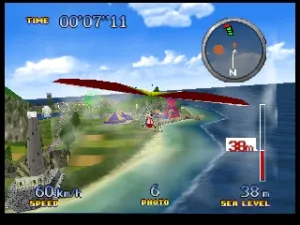
Pilotwings 64 (Europe) (En,Fr,De)
Pilotwings 64 (Europe) (En,Fr,De) Overview
Pilotwings 64 is a flight simulation game released for the Nintendo 64 in Europe. Developed by Nintendo, this title is part of the Pilotwings series and showcases the capabilities of the N64's graphics and controls. It was launched in 1996 and is known for its engaging gameplay that combines various flying vehicles and challenges.
In Pilotwings 64, players take on the role of a pilot, navigating through a series of flight-based challenges using different aircraft, including hang gliders, jetpacks, and helicopters. The game's structure revolves around completing specific objectives within a time limit, such as landing on targets or performing stunts. Each vehicle has unique controls and mechanics, requiring players to adapt their approach as they progress through the various levels.
This title remains a noteworthy entry in the N64 library, particularly for fans of simulation games. Its charming graphics and innovative use of 3D environments were impressive at the time of release. While it may not have the same level of popularity as some other titles from the era, Pilotwings 64 offers a unique experience that is worth exploring for those interested in flight simulation and the early days of 3D gaming.
How to Play Pilotwings 64 (Europe) (En,Fr,De) Online
Getting started in Pilotwings 64 involves selecting a mission from the game's main menu. Players can choose from various flight challenges that require different skills and techniques. As you begin, familiarize yourself with the controls of the specific vehicle you are using, as each has its own handling characteristics.
The gameplay loop consists of completing objectives within each mission, such as landing on specific targets or performing aerial tricks. As you progress, the challenges become more complex, requiring practice and precision. Keep an eye on your time and aim to improve your scores, as this adds a layer of competition and encourages replayability.
Pilotwings 64 (Europe) (En,Fr,De) Keyboard Controls
Controls
- Arrow Keys — D-Pad / Movement
- X — A button
- S — B button
- Z — Z trigger
- A — C-Down
- Q — L shoulder
- E — R shoulder
- Enter — Start
Comments (0)