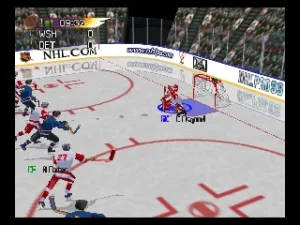
NHL Pro 99 (Europe)
Getting to Know NHL Pro 99 (Europe)
NHL Pro 99 (Europe) is a sports video game that was released for the Nintendo 64. While specific details about the developer or publisher are not widely documented, the game is part of the NHL series, known for its arcade-style hockey gameplay. This title reflects the gaming trends of the late 90s, where sports games were becoming increasingly popular on home consoles.
In NHL Pro 99, players engage in fast-paced hockey matches, utilizing a variety of teams and players from the NHL. The game emphasizes arcade-style mechanics, which means gameplay is more accessible compared to simulation-heavy titles. Players can control their skaters, execute passes, and take shots on goal, making for an exciting experience as they aim to outscore their opponents.
Today, NHL Pro 99 may not be as well-known as some other hockey games, but it represents a time when sports gaming was evolving on consoles. While it may feel simplistic compared to modern titles, it captures the essence of arcade hockey in an era when multiplayer gameplay was a key focus. For fans of retro sports games, it’s a fun nostalgic trip that offers a glimpse into the past of hockey gaming on the Nintendo 64.
How to Play NHL Pro 99 (Europe) Online
Getting started in NHL Pro 99 involves selecting your team and opponent before jumping into a match. The core gameplay loop revolves around skating, passing, and shooting the puck, with the goal of outscoring your opponent. Familiarizing yourself with the controls is essential, as mastering skating and shooting mechanics can significantly enhance your performance on the ice.
As you play, you'll notice that quick reflexes and strategic plays are crucial. The game allows for single-player and multiplayer matches, so whether you’re playing against the AI or with friends, the excitement remains high. Pay attention to team strengths and weaknesses, and utilize your players effectively to secure a win.
NHL Pro 99 (Europe) Keyboard Controls
Controls
- Arrow Keys — D-Pad / Movement
- X — A button
- S — B button
- Z — Z trigger
- A — C-Down
- Q — L shoulder
- E — R shoulder
- Enter — Start






Comments (0)