Xenon 2 - Megablast (Japan)
Inside Xenon 2 - Megablast (Japan)
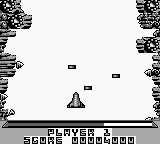
Xenon 2 - Megablast is a shooter game released exclusively in Japan for the Game Boy. It is part of the Xenon series, originally developed by the Bitmap Brothers for various platforms. This version adapts the gameplay for the handheld experience, fitting into the action genre that dominated the gaming landscape during the early 90s.
In the game, players control a ship navigating through a series of challenging levels filled with enemies and obstacles. The core mechanics involve shooting at foes while dodging incoming attacks, with power-ups available to enhance weaponry and defenses. Each level presents unique designs and enemy patterns, pushing players to refine their skills and strategies as they progress.
Despite being a niche title, Xenon 2 - Megablast offers a solid retro experience that appeals to fans of classic shooters. Its mechanics are reminiscent of other titles from that era, providing a nostalgic journey for those who appreciate the genre. While it may not be as widely recognized as some contemporaries, it holds a place in the hearts of retro gaming enthusiasts who enjoy uncovering lesser-known gems.
How to Play Xenon 2 - Megablast (Japan) Online
Getting started with Xenon 2 - Megablast involves selecting your game mode from the main menu, which is presented in Japanese. Once you’re in, you’ll navigate through levels filled with enemies, using your ship's weapons to defeat them while avoiding damage. The gameplay revolves around shooting and maneuvering, with power-ups that enhance your ship's capabilities.
As you progress through each stage, it’s essential to learn enemy patterns and level layouts. The game rewards players who can adapt their strategies to different challenges. Keep an eye out for power-ups, as they are crucial for overcoming tougher enemies and bosses. Don't forget to familiarize yourself with the controls to maximize your performance in this fast-paced shooter.
Xenon 2 - Megablast (Japan) Keyboard Controls
Controls
- Arrow Keys — D-Pad / Movement
- X — A button (jump / confirm)
- S — B button (run / attack / cancel)
- Enter — Start / Pause
- V — Select


Comments (0)