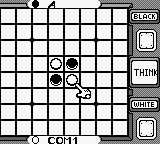
Othello (Japan)
About Othello (Japan)
Othello for the Game Boy is a digital adaptation of the classic board game, originally released in Japan. This puzzle game, developed by an unknown studio, captures the essence of Othello, allowing players to engage in strategic gameplay on a portable platform. The game was released during the height of the Game Boy's popularity, a time when handheld gaming was becoming increasingly mainstream.
In Othello, players take turns placing discs on an 8x8 board, aiming to outmaneuver their opponent by flipping their discs to their color. The mechanics are straightforward: you can only place a disc in a position that sandwiches your opponent's discs between yours. This simple yet deeply strategic gameplay creates a unique experience that challenges players to think several moves ahead, making each match engaging and competitive.
This title is worth trying today for fans of classic board games and puzzle enthusiasts alike. While it may not have the depth of some contemporary titles, Othello offers a nostalgic look back at a simpler time in gaming. Its straightforward mechanics and the challenge of outsmarting an opponent make it a timeless choice for quick gaming sessions, especially for those who appreciate strategy games from the Game Boy era.
How to Play Othello (Japan) Online
To get started with Othello, select the game mode from the main menu. Since this title is in Japanese, look for the first option to begin a new game. The core gameplay loop revolves around placing your discs strategically to flip your opponent's discs, so familiarize yourself with the rules of Othello if you're not already acquainted.
As you play, keep an eye on the board and think about your moves carefully. Each turn, you can only place a disc in a position that allows you to flip at least one of your opponent's discs. The game ends when the board is full or no more moves can be made, providing a satisfying challenge for both new and experienced players.
Othello (Japan) Keyboard Controls
Controls
- Arrow Keys — D-Pad / Movement
- X — A button (jump / confirm)
- S — B button (run / attack / cancel)
- Enter — Start / Pause
- V — Select

Comments (0)