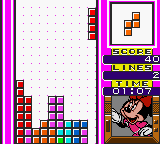
Tetris Adventure - Susume Mickey to Nakama-tachi (Japan)
Tetris Adventure - Susume Mickey to Nakama-tachi (Japan) Overview
Tetris Adventure - Susume Mickey to Nakama-tachi is a Japan-exclusive puzzle game for the Game Boy Color that combines classic block-stacking gameplay with Disney's Mickey Mouse and friends. It was released during the late 1990s or early 2000s, though the exact year and developer aren't widely documented. What sets it apart from other Tetris titles is the presentation: instead of plain blocks, you're moving colorful pieces themed around Mickey, Minnie, Donald, and other characters, making it a charming little oddity in the GBC library.
How to Play Tetris Adventure - Susume Mickey to Nakama-tachi (Japan) Online
Getting Started
This is a Japanese-only release, so the menus are entirely in Japanese. The core loop is familiar Tetris: blocks fall from the top of the playfield and you rotate and move them left or right to create complete horizontal lines. When a line is cleared, it disappears and the stack above drops down. The game likely includes a story mode or adventure mode where you progress through levels by meeting line-clear goals.
Start by pressing Enter to get past the title screen, then use the D-pad to navigate menu options. The first option is usually Start or New Game. Once in game, use the arrow keys to move pieces left or right, X to rotate them clockwise, and S to drop them faster. The goal is to survive as long as possible without the blocks piling to the top. If you fill the screen, it's game over.
New players should focus on stacking flat and clearing lines evenly. Look ahead to plan where the next piece might fit. The Disney theme is cosmetic, so the puzzle mechanics are standard Tetris. No special power-ups or gimmicks are confirmed, but the presentation gives it a friendly, non-competitive feel.
Tetris Adventure - Susume Mickey to Nakama-tachi (Japan) Keyboard Controls
Controls
- Arrow Keys: D-Pad / Movement
- X: A button (jump / confirm)
- S: B button (run / attack / cancel)
- Enter: Start / Pause
- V: Select





Comments (0)