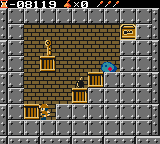
Solomon (Japan)
Solomon (Japan) Overview
This is a Game Boy Color port of Solomon's Key, the classic arcade puzzle game originally released by Tecmo back in 1986. While the NES and Game Boy versions are better known in the West, this Japanese-exclusive release for the Game Boy Color brings the same block-destroying, key-collecting action to a portable color screen. It's a straightforward port of the formula, not a remake or a hack, so if you've played Solomon's Key before you'll know exactly what to expect. The cartridge was only sold in Japan, which means menus and text are in Japanese throughout.
How to Play Solomon (Japan) Online
Getting Started
When the game boots you'll see a title screen and then a stage select or the first level. Use the D-Pad to move the wizard left and right. Press X to jump and S to create or destroy blocks depending on context. Your goal in each stage is to reach the exit door, often after collecting a key or defeating a few enemies. Blocks can be summoned to form platforms or to block enemy paths, and you can erase them to clear passages.
The core loop is simple: survey the room, figure out which blocks to create or remove to open a route, then dodge or trap the roaming monsters while working your way to the key and the door. Mistakes can often be undone by destroying blocks you just placed, but some stages have limited block counts. Since the menus are entirely in Japanese, you may need to rely on trial and error to navigate options like continue or sound settings, but the gameplay itself is intuitive once you start.
If you get stuck, remember that you can usually jump on enemies to stun them, and that some blocks hide power-ups like extra lives or magic when destroyed. The game is a pure puzzle-platformer with no role-playing or story elements, so just focus on each room as a self-contained challenge.
Solomon (Japan) Keyboard Controls
Controls
- Arrow Keys: D-Pad / Movement
- X: A button (jump / confirm)
- S: B button (run / attack / cancel)
- Enter: Start / Pause
- V: Select





Comments (0)