Snoopy Tennis (Japan)
Snoopy Tennis (Japan) on GBC
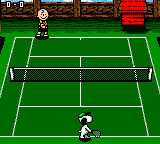
In Snoopy Tennis, you take control of a Peanuts character and compete in standard tennis matches against computer-controlled opponents. The core loop involves serving, returning volleys, and moving around the court to outplay your rival. While the gameplay sticks to basic tennis mechanics - no power-ups or wild twists - the charm comes from seeing these beloved characters on a tiny GBC screen. Menus are in Japanese, but the tennis action is intuitive enough to pick up without reading the text.
If you're a Peanuts fan or a collector of niche Game Boy Color sports titles, Snoopy Tennis is worth a quick look. It's not a deep or challenging game, but the simple gameplay and cute sprite art capture the lighthearted spirit of the franchise. Compared to other GBC tennis games, it's more about novelty than complexity, making it a pleasant diversion rather than a must-have. Just don't expect anything groundbreaking - it's a straightforward, fun little tennis game that does exactly what it says on the cartridge.
How to Play Snoopy Tennis (Japan) Online
Getting Started
When you first boot up Snoopy Tennis, you'll likely see a title screen with Japanese text. Press Enter (Start) to proceed. You'll probably be taken to a menu where you can choose a character to play as - Charlie Brown, Snoopy, or others from the Peanuts cast. Use the D-Pad to highlight your selection and press X (A button) to confirm.
The core gameplay is simple: you face off against a computer opponent in a standard tennis match. Move your character with the D-Pad, press X to swing (or serve), and press S (B button) for a different shot type (if applicable). The goal is to win points by making the ball land in your opponent's court twice. Since the menus are entirely in Japanese, you may need to experiment with options to start a match or adjust settings, but the tennis action itself is easy to grasp.
There's no deep story mode - just pick a character and play. If you lose, you can retry or change characters. The game is straightforward, perfect for short sessions. If you're playing on an emulator, the controls map naturally to the keyboard, so you can jump right in without much trouble.
Snoopy Tennis (Japan) Keyboard Controls
Controls
- Arrow Keys: D-Pad / Movement
- X: A button (jump / confirm)
- S: B button (run / attack / cancel)
- Enter: Start / Pause
- V: Select






Comments (0)