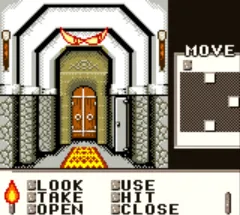
Shadowgate Classic (USA, Europe) (En,Fr,De,Es,Sv) (Rev A)
Getting to Know Shadowgate Classic (USA, Europe) (En,Fr,De,Es,Sv) (Rev A)
Shadowgate Classic is a point-and-click adventure game that originally appeared on the Macintosh and PC, then found its way to the Game Boy Color as a faithful port. This specific ROM is labeled Rev A, a later revision that likely fixed bugs or adjusted localization for English, French, German, Spanish, and Swedish speaking audiences. It was published by Kemco in 1999 for North America and 2000 for Europe, bringing the classic dungeon-crawling experience to a handheld screen for the first time.
You guide an adventurer through the treacherous halls of Castle Shadowgate, exploring detailed environments shown from a first-person perspective. The core loop involves navigating static screens, examining objects, picking up items, and solving puzzles - often by combining inventory items or using them in the right spot. Death lurks around every corner, from pressure plates to cursed objects, so saving often is key. The Game Boy Color version adapts the original mouse-driven interface to a cursor controlled by the D-pad, with button presses to interact and manage your inventory.
For fans of classic graphic adventures, Shadowgate Classic remains a solid entry on the Game Boy Color. It's a straightforward port that preserves the original's challenging puzzles and eerie atmosphere without adding new content or flashy extras. Compared to similar handheld adventures of the era, it stays true to its roots - no hand-holding, just exploration and trial-and-error problem solving. If you enjoy games that test your wits and patience, this one is worth a look.
How to Play Shadowgate Classic (USA, Europe) (En,Fr,De,Es,Sv) (Rev A) Online
Getting Started
When you first start Shadowgate Classic, you'll see a title screen. Press Enter to begin the game. You take control of an adventurer standing before the entrance of Castle Shadowgate. Your immediate goal is to examine your surroundings and find a way inside. Move the cursor with the Arrow Keys and press X to interact with objects or examine them.
The game is built around progression through distinct rooms. In each room, you'll need to look for clues, collect important items, and figure out how to proceed. Your inventory is key - press V to open it, then select an item and use it on the environment. Be careful: many objects are traps or require specific actions to avoid death. Save often using the in-game menu (Enter) to avoid losing progress.
There is no combat in Shadowgate Classic. Every challenge is a puzzle, and many have multiple solutions or hidden triggers. If you get stuck, try examining everything twice or using different items in different places. The game expects you to take notes or remember room layouts, so feel free to explore methodically.
Shadowgate Classic (USA, Europe) (En,Fr,De,Es,Sv) (Rev A) Keyboard Controls
Controls
- Arrow Keys: D-Pad / Movement
- X: A button (jump / confirm)
- S: B button (run / attack / cancel)
- Enter: Start / Pause
- V: Select
Comments (0)