Rox (Japan)
Getting to Know Rox (Japan)
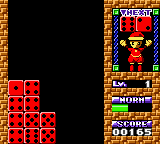
Rox is a puzzle game that originally appeared on the PlayStation and Sega Saturn before making its way to the Game Boy Color. This Japanese release puts a twist on the falling-block formula with a focus on matching colors and clearing lines. It's a lesser-known title that fits into the late-90s puzzle craze, offering a portable version of a console-original experience.
Players manipulate falling blocks to form solid rows, but Rox adds a unique element: you can rotate the playfield itself, changing which direction gravity pulls the pieces. The goal is to prevent blocks from stacking to the top while clearing as many lines as possible. The Game Boy Color version keeps the core mechanics intact, though with a smaller screen and simplified visuals.
For puzzle fans, Rox offers a slightly different take on the genre compared to the more famous Tetris or Puyo Puyo. Its rotating arena mechanic sets it apart, making it worth a try for anyone who enjoys brain-teasing challenges. This is not a flagship title, but it's a solid addition to the GBC library and a neat piece of cross-platform history.
How to Play Rox (Japan) Online
Getting started: When you launch Rox, you'll see a title screen with Japanese text. Press Start to move to the main menu, then select the first option to begin a new game. The game will present a playfield where colored blocks fall from the top. Your objective is to arrange them so they form complete horizontal lines, which then disappear.
Use the D-Pad to move blocks left or right, and press the A button (X key) to rotate them. What makes Rox different is that you can also rotate the entire playfield by pressing the shoulder buttons (Q and E). This changes the direction of gravity, allowing blocks to fall sideways or upward, opening up new strategic possibilities. The core loop involves quick decision-making: choose whether to rotate the field or just adjust the falling piece.
Since this is the Japanese version, all menu text and in-game prompts are in Japanese. If you don't read the language, just stick with the first menu option to start. The basic gameplay is visual enough to pick up quickly. There is no in-game tutorial, so expect some trial and error when learning the rotation mechanic.
Rox (Japan) Keyboard Controls
Controls
- Arrow Keys: D-Pad / Movement
- X: A button (jump / confirm)
- S: B button (run / attack / cancel)
- Enter: Start / Pause
- V: Select





Comments (0)