The game loads when you press Play · press “Play Now” inside the game if it asks.
Minna no Shougi - Shokyuu Hen (Japan)
Minna no Shougi - Shokyuu Hen
About Minna no Shougi - Shokyuu Hen
- Game Boy Color
- Strategy
- 5· 0 votes
GAME INFO
- Platform
- Game Boy Color
- Genre
- Strategy
- Players
- 1-2
- Region
- Japan
How to play Minna no Shougi - Shokyuu Hen online
Getting Started
When you boot up Minna no Shougi - Shokyuu Hen, you'll be greeted by a Japanese title screen. Press Start (Enter) to proceed. The main menu will have options likely starting with new game, continue, versus player, and settings. Since this is a beginner edition, the first option is probably a single-player game against the computer at the easiest difficulty.
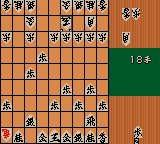
Use the D-Pad to move a cursor around the 9x9 board. Select a piece by pressing the A button (X key). The game will highlight legal moves. Move the cursor to a highlighted square and press A again to drop the piece. Press B (S key) to deselect or cancel a move. The goal is to checkmate your opponent's king, just like in standard shogi, you can also capture dropped pieces.
Menus are entirely in Japanese, so you may need to rely on memorization or a translation guide. Typically, the first row is for starting a new game, the second for loading a saved game, and the third for settings (like difficulty or sound). If you want to play two-player, look for an option that has '2' or 'vs' in the menu. The link cable mode requires two cartridges. Take your time learning the piece movements - the game is patient and won't rush you.
CONTROLS
Controls
- Arrow Keys: D-Pad / Movement
- X: A button (jump / confirm)
- S: B button (run / attack / cancel)
- Enter: Start / Pause
- V: Select
Minna no Shougi - Shokyuu Hen FAQ
Who developed Minna no Shougi - Shokyuu Hen?
The developer is not widely documented in English sources, but the game was published by Mainichi Communications, a Japanese company active in the late 1990s and early 2000s. Without official credits it's difficult to name the specific studio behind the code.
Is Minna no Shougi - Shokyuu Hen exclusive to Game Boy Color or did it appear on other systems?
This title was released exclusively for the Game Boy Color in Japan. There are no known ports to other consoles or computers, though similar 'Minna no Shougi' entries exist on other platforms like the PlayStation as part of a series.
What type of game is Minna no Shougi - Shokyuu Hen?
It is a video game adaptation of the board game shogi (Japanese chess) and belongs to the strategy board game genre. The 'shokyuu hen' subtitle indicates it is designed for beginners, with simplified AI and possibly tutorial elements to teach the rules.
You may also like
All Game Boy Color games











GAME INFO
- Platform
- Game Boy Color
- Genre
- Strategy
- Players
- 1-2
- Region
- Japan
COMMENTS (0)
No comments yet. Be the first to share your thoughts.