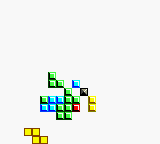
Klustar (Europe) (En,Fr,De,Es,It)
Klustar (Europe) (En,Fr,De,Es,It) on GBC
Klustar is a puzzle game that landed on the Game Boy Color in 1999. Developed by Rebellion Developments and published by Infogrames, it was released in Europe with support for English, French, German, Spanish, and Italian. This is not a hack or homebrew but a proper commercial release that fits squarely in the falling-block puzzle genre.
At its core, you manipulate blocks as they descend onto a grid. Unlike Tetris, which clears complete horizontal lines, Klustar challenges you to match specific patterns or colors on the blocks. Rotate and position each piece to form the required patterns, clearing them off the board. The stack keeps rising, so quick thinking and pattern recognition are key to surviving.
For retro puzzle fans, Klustar offers a competent and enjoyable twist on a familiar formula. It's not revolutionary, but it's well-made and runs smoothly on the Game Boy Color hardware. If you enjoy block-matching games from the late 90s, this one is worth a few rounds. Its multi-language support also makes it accessible to a wider European audience.
How to Play Klustar (Europe) (En,Fr,De,Es,It) Online
Getting started in Klustar is straightforward. Once you press Start (Enter key) to begin, you'll see a grid and blocks start falling from the top. Use the D-Pad (arrow keys) to move the current block left or right, and the A button (X key) to rotate it. Your goal is to arrange the falling blocks so that they match the pattern shown on the side of the screen. When the pattern is matched, those blocks disappear and you earn points.
The game continues with new blocks and patterns at an increasing speed. If the blocks stack up to the top of the grid, it's game over. Try to clear blocks efficiently to keep the stack low. There's no story or complex mechanics here - just pure pattern-matching action. Take a moment to understand the pattern display before the first block lands, and you'll be off to a good start.
Klustar (Europe) (En,Fr,De,Es,It) Keyboard Controls
Controls
- Arrow Keys: D-Pad / Movement
- X: A button (jump / confirm)
- S: B button (run / attack / cancel)
- Enter: Start / Pause
- V: Select





Comments (0)