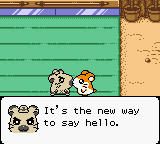
Hamtaro - Ham-Hams Unite! (Europe) (En,Fr,De,Es,It)
What is Hamtaro - Ham-Hams Unite! (Europe) (En,Fr,De,Es,It)?
Hamtaro - Ham-Hams Unite! is an adventure game for the Game Boy Color, developed by Shogakukan and published by Nintendo. This European release supports five languages: English, French, German, Spanish, and Italian. It holds a notable place in gaming history as the very last officially released Game Boy Color game in both the United States and Europe, arriving near the end of the handheld's lifespan.
In Hamtaro - Ham-Hams Unite!, you guide the titular hamster through various environments, interacting with other ham-hams and solving simple puzzles to progress. The game emphasizes exploration and communication, as you collect items and help friends overcome obstacles. Each area presents its own set of challenges, and the story unfolds as you complete objectives.
As the final official Game Boy Color title, Hamtaro - Ham-Hams Unite! holds a special curiosity for collectors and retro enthusiasts. Its charming visuals and straightforward gameplay make it an easy pick-up for anyone who enjoyed handheld adventure games of the era. While not a technical showcase, it offers a relaxed, wholesome experience that stands as a fitting farewell to the platform.
How to Play Hamtaro - Ham-Hams Unite! (Europe) (En,Fr,De,Es,It) Online
When you start the game, you'll see a title screen. Press Start to begin. The opening introduces the story; you control Hamtaro as he explores and interacts with other hamsters.
The core loop involves moving between areas, talking to characters, and using items you find or receive. Pay attention to dialogue clues to figure out what to do next. The game is linear overall, but you can revisit areas.
Because this European version includes multiple languages, you can select your preferred language at the start if the system language isn't recognized. The controls are simple, so casual players should have no trouble.
Hamtaro - Ham-Hams Unite! (Europe) (En,Fr,De,Es,It) Keyboard Controls
Controls
- Arrow Keys: D-Pad / Movement
- X: A button (jump / confirm)
- S: B button (run / attack / cancel)
- Enter: Start / Pause
- V: Select

Comments (0)