![Game Boy Wars 2 (Japan) [En by TransBRC v1.02]](/uploads/games/g-620855c80093.webp)
Game Boy Wars 2 (Japan) [En by TransBRC v1.02]
Game Boy Wars 2 (Japan) [En by TransBRC v1.02] Overview
Game Boy Wars 2 is a turn-based strategy game that originally hit shelves in Japan for the Game Boy Color back in 1998. It's the second entry in Nintendo's portable war simulation series, serving as a precursor to what Western audiences would later know as Advance Wars. What we have here is not the raw Japanese ROM, but a fan-translated version called "Game Boy Wars 2 (Japan) [En by TransBRC v1.02]." This English patch was put together by the TransBRC group, making the menus, unit names, and brief story text readable for non-Japanese speakers. If you ever wondered what Nintendo's handheld strategy looked like before the series went global, this is your chance to find out without digging out a dictionary.
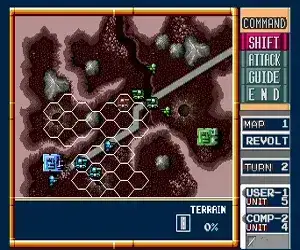
The core loop is classic turn-based warfare. You pick a side, deploy units from a headquarters, and capture enemy bases to build more troops. Each turn you move your soldiers, tanks, and aircraft across a grid, then order them to attack adjacent enemies. Terrain like forests and rivers affects movement and defense, so positioning matters more than raw numbers. The victory condition is usually wiping out the opponent's army or capturing their HQ. There's a campaign mode with linked missions, plus a versus mode for two players if you have a link cable and a second copy of the game.
For what it is, Game Boy Wars 2 holds up nicely if you dig careful, thoughtful strategy. It's slower and smaller in scale than later Advance Wars games, but the core ideas are already solid. The translation patch cleans up the biggest barrier to entry, so you can actually understand the unit stats and victory conditions. If you're into Famicom Wars, Super Famicom Wars, or the early Advance Wars titles, this is a neat historical piece that shows the series refining its formula on color portable hardware. It's not flashy or deep, but it's a competent turn-based war game that deserves a look from strategy fans who missed it the first time.
How to Play Game Boy Wars 2 (Japan) [En by TransBRC v1.02] Online
Section 1 - Controls
Section 2 - Getting Started
When you boot up Game Boy Wars 2 with the TransBRC translation, the menus are in English now, so you can navigate them without trouble. Your first move is to pick a game mode from the title screen - Campaign (the main story) or Versus (for two players). Campaign throws you into a series of linked battles where you control one army and try to defeat the other. Each mission gives you a briefing about the map objectives and what units you have available.
The turns are split into two phases: your turn and the enemy's turn. On your turn, you highlight a unit with the D-Pad and press X (A button) to select it. A movement range appears, and you move with the D-Pad, then press X again to end movement. To attack, move adjacent to an enemy and press S (B button). After attacking, the unit usually gets a chance to counter, so think before you commit. Capturing enemy bases requires moving an infantry unit onto the building and pressing A repeatedly (or just keeping them there) until the flag changes color.
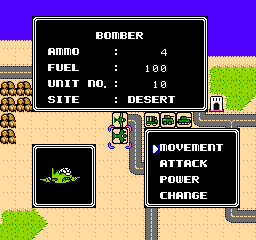
Key things to remember: units have limited fuel and ammo, so keep an eye on those. Resupply by parking on a city or airport you own. Different terrains affect movement costs and defensive bonuses. There's no undo button, so every move matters. If you get stuck, try combining different unit types - tanks for direct assault, artillery for indirect fire, and infantry for capturing buildings. The AI can be ruthless, so don't rush; sometimes sitting back and building forces is the better play.
Game Boy Wars 2 (Japan) [En by TransBRC v1.02] Keyboard Controls
Controls
- Arrow Keys: D-Pad / Movement
- X: A button (jump / confirm)
- S: B button (run / attack / cancel)
- Enter: Start / Pause
- V: Select
Comments (0)