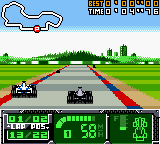
F1 World Grand Prix II for Game Boy Color (USA) (En,Fr,De,Es)
Inside F1 World Grand Prix II for Game Boy Color (USA) (En,Fr,De,Es)
F1 World Grand Prix II for Game Boy Color is a racing simulation based on the 1999 Formula One World Championship. Released in 2000, this sequel improved on its predecessor with better graphics and more accurate team and driver lineups. It was developed for Nintendo's handheld and published in North America and Europe as an official licensed product, bringing the glamour and speed of F1 to a portable format.
You take control of one of the eleven real teams and their drivers from the 1999 season, including names like McLaren, Ferrari, and Williams. The game offers a full championship mode where you practice, qualify, and race on authentic circuits such as Monaco, Silverstone, and Suzuka. Besides the main season, there are quick race and two-player link cable options. Car setup matters - you can adjust tire compounds, gear ratios, and wing angles to suit each track, directly influencing handling and speed.
For fans of classic handheld racing, this title stands as one of the more serious F1 sims on the Game Boy Color. It doesn't reinvent the genre but delivers a solid, faithful adaptation that captures the tension of a Grand Prix weekend. The pixel art is clean and the gameplay is challenging enough to keep you coming back for one more lap. If you enjoy retro racing games with a focus on realism over arcade action, this is worth a look.
How to Play F1 World Grand Prix II for Game Boy Color (USA) (En,Fr,De,Es) Online
Getting started with F1 World Grand Prix II is straightforward. After booting the game, you will be asked to select your language (English, French, German, or Spanish). From the main menu, choose "Grand Prix" to start a full championship, "Quick Race" for a single event, or "Time Trial" to practice alone. If you have a link cable and a friend, the "2 Players" mode lets you race head-to-head.
Once you pick a mode, you will need to select a team and driver. Each team has different car performance, so try a few to see what suits your driving style. The core loop is simple: navigate the menus, set your car setup if desired, then race against AI opponents. Braking early and staying smooth through corners is key - the physics are simulation-like, so aggressive driving will send you into the barriers.
A few tips: use practice sessions in Grand Prix mode to learn the track layout and find the best gear settings. The game does not hold your hand, so expect to spin out if you push too hard. If you find the difficulty too high, you can adjust the AI strength in the options menu before starting a championship. The controls are responsive, so once you get a feel for braking points, you will be fighting for podiums in no time.
F1 World Grand Prix II for Game Boy Color (USA) (En,Fr,De,Es) Keyboard Controls
Controls
- Arrow Keys: D-Pad / Movement
- X: A button (jump / confirm)
- S: B button (run / attack / cancel)
- Enter: Start / Pause
- V: Select


Comments (0)