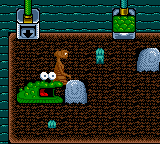
E.T. and the Cosmic Garden (Europe) (En,Fr,De,Es,It,Nl)
E.T. and the Cosmic Garden (Europe) (En,Fr,De,Es,It,Nl): GBC Adventure
In E.T. and the Cosmic Garden, you guide the little alien through a series of garden-themed areas. The core gameplay involves exploring colorful screens, interacting with objects, and completing simple tasks - likely watering plants, collecting items, and helping the garden grow. Movement is side-scrolling or top-down, common for Game Boy Color adventure-lite titles. There are likely puzzles to solve and obstacles to overcome, all presented in a friendly, low-stakes manner that fits the character's gentle personality.
Today, this game is a curiosity for retro collectors who enjoy obscure licensed titles. It's not a system seller or a hidden gem - it's a simple, kid-oriented game that does its job without much flash. If you're into the E.T. franchise or want to see how movie characters were handled on handhelds in that period, it's worth a quick playthrough. Just don't expect deep mechanics or high replay value. It's a pleasant time capsule from the Game Boy Color's library of movie tie-ins.
How to Play E.T. and the Cosmic Garden (Europe) (En,Fr,De,Es,It,Nl) Online
Getting Started
When you start the game, you'll first be asked to pick your language from the options shown. Use the D-Pad to highlight your choice and press A to confirm. The game then begins with E.T. standing in a small garden area. Your goal is to explore the screen, talk to characters (likely by walking up to them and pressing A), and collect items that help the garden grow.
Move with the D-Pad, and use A to interact with objects or people. B might let you do a secondary action like cancel or run. There's usually no combat - just light puzzle-solving and exploration. Keep an eye on the on-screen hints; the game is designed to be approachable for younger players. If you get stuck, try talking to every character and picking up everything you see.
The core loop is simple: enter a new area, find what needs to be done, gather the required items, and return them to the right spot. Progress is saved automatically or via a password system - check the manual if you encounter one. Since this is a European release, all menus and text are in the language you selected, so no language barrier for English speakers.
E.T. and the Cosmic Garden (Europe) (En,Fr,De,Es,It,Nl) Keyboard Controls
Controls
- Arrow Keys: D-Pad / Movement
- X: A button (jump / confirm)
- S: B button (run / attack / cancel)
- Enter: Start / Pause
- V: Select
Comments (0)