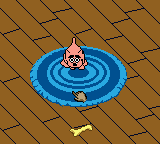
Dogz - Your Virtual Petz Palz (Europe)
Dogz - Your Virtual Petz Palz (Europe) - Simulation Classic
Dogz - Your Virtual Petz Palz is a handheld adaptation of the popular PC virtual pet simulation series, released for the Game Boy Color in Europe. This version brings the experience of raising a digital puppy to a portable console, letting you care for a cute canine companion on the go. While the exact developer and publisher aren't widely documented for this specific European release, it's part of the broader Petz franchise that started on home computers in the mid-1990s.
The core gameplay revolves around tending to your virtual dog's needs. You feed it, give it water, play with it using various toys, and keep it clean by brushing or bathing it. The game uses a simple menu-driven interface where you select activities with the D-pad and A/B buttons. Over time, your dog's mood and health change based on how well you care for it, and you can teach it tricks or watch it grow. The goal is to maintain a happy, healthy pet by regularly checking in and responding to its cues.
Today, Dogz - Your Virtual Petz Palz is a charming relic of the late-90s virtual pet craze, sitting alongside Tamagotchi and other digital companions. It's a straightforward, no-pressure experience that appeals to anyone who enjoys low-commitment pet caring games on old hardware. The graphics are simple but expressive, and the portability of the Game Boy Color makes it easy to revisit, even if it lacks the depth of more recent simulation games. It's worth trying for nostalgia or for collectors of the Petz series.
How to Play Dogz - Your Virtual Petz Palz (Europe) Online
Getting started: After loading the game, you'll likely be prompted to choose a dog from a selection of breeds or colors. Use the D-pad to highlight your choice and press the A button (X key) to confirm. The game will then begin with your new pet in its living space.
The core loop involves checking your dog's status indicators, which show hunger, happiness, hygiene, and energy. Select options from the menu that appears on screen - items like Feed, Play, Wash, or Bed. Press A to choose, then follow on-screen prompts (often selecting an item from a submenu). The D-pad navigates, and B cancels. Over time, your pet's needs change, so you'll need to revisit menu options regularly.
There are no complex puzzles or combat. The challenge is simply maintaining a routine to keep your pet healthy. Pay attention to visual cues: a sad face or low heart icon means it needs attention. The game runs in real time with a clock, so if you leave it idle, your dog may become unhappy. Save by quitting through the menu, though the exact save system varies - check the manual if you have one, but on emulators you can rely on save states.
Dogz - Your Virtual Petz Palz (Europe) Keyboard Controls
Controls
- Arrow Keys: D-Pad / Movement
- X: A button (jump / confirm)
- S: B button (run / attack / cancel)
- Enter: Start / Pause
- V: Select




Comments (0)