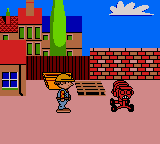
Bob the Builder - Fix it Fun! (Europe) (En,Sv,No,Da,Fi)
Bob the Builder - Fix it Fun! (Europe) (En,Sv,No,Da,Fi) Overview
Bob the Builder: Fix it Fun! is a Game Boy Color title that brought the popular children's TV character to handhelds. Released in Europe with multilingual support including English, Swedish, Norwegian, Danish, and Finnish, this game arrived during the late 1990s or early 2000s when licensed platformers were common on the system. The exact developer and publisher are not widely documented, but it fits the era's trend of simple, colorful games aimed at preschool audiences.
In Bob the Builder: Fix it Fun!, players take control of Bob as he works on various construction projects around town. The gameplay involves completing simple tasks like hammering, painting, or moving objects, often presented as mini-games or small levels. The D-pad moves Bob, while the A and B buttons interact with objects and characters. Progress is made by finishing each job, with encouraging feedback keeping the experience positive and accessible for young players.
Today, this title is a niche curiosity for retro collectors who appreciate licensed games from the Game Boy Color library. It is not a deep or challenging game, but it captures the gentle, can-do spirit of the TV show. For fans of Bob the Builder or those interested in how children's media translated to early handhelds, Fix it Fun! offers a straightforward look at the era's approach to licensed software. It remains a functional if unremarkable part of the system's family-friendly catalog.
How to Play Bob the Builder - Fix it Fun! (Europe) (En,Sv,No,Da,Fi) Online
Getting Started
When you start Bob the Builder: Fix it Fun!, you will likely see a title screen with Bob and his friends. Press Enter to start the game, then select a save file or begin a new game if prompted. The game is designed for very young players, so the opening levels will introduce basic tasks like walking left or right and pressing A to use tools.
Each level presents a simple goal, such as fixing a fence or painting a wall. Move Bob with the Arrow Keys, approach the task, and press the appropriate button to complete it. Watch for on-screen prompts or speech bubbles from characters like Wendy or Scoop. The core loop is completing these small jobs to advance to the next area. There is no failure state in many parts, so feel free to explore without stress.
If you get stuck, try pressing the B button to cancel an action or interact with a different object. The game uses a password or save system to keep progress, but specific methods are not well documented. For the best experience, approach it as a gentle, guided adventure meant for children learning to use a Game Boy.
Bob the Builder - Fix it Fun! (Europe) (En,Sv,No,Da,Fi) Keyboard Controls
Controls
- Arrow Keys: D-Pad / Movement
- X: A button (jump / confirm)
- S: B button (run / attack / cancel)
- Enter: Start / Pause
- V: Select


Comments (0)