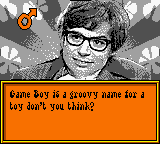
Austin Powers - Oh, Behave! (Europe) (En,Fr,De,Es,It)
About Austin Powers - Oh, Behave! (Europe) (En,Fr,De,Es,It)
Austin Powers - Oh, Behave! for the Game Boy Color is a peculiar piece of licensed software released in Europe in September 2000. Developed by Tarantula Studios, it turns your handheld into a simulated, Austin Powers-themed personal computer. It's essentially a digital organizer rather than a typical action or platforming game, fitting more into the simulation or utility category. The cartridge supports multiple languages (English, French, German, Spanish, Italian), which made it accessible across Europe.
Instead of controlling a character through levels, you interact with a virtual desktop environment. The main screen presents different applications like a clock, calendar, notepad, and maybe a few simple games or tools. The D-Pad is used to highlight icons, and the A button selects them. You can set alarms, write short memos, and possibly keep track of appointments. It's a very straightforward point-and-click-like interface, limited only by the Game Boy Color's screen resolution and button layout.
Today, this game is mostly a curiosity for Austin Powers fans and collectors of odd Game Boy Color titles. It's not a deep or challenging game - it's more of a novelty that tries to turn the GBC into a digital assistant with a groovy spy twist. If you enjoy quirky, era-specific software simulations (like the various 'virtual pets' or 'organizer' carts), it's worth a quick look. But don't expect anything you'd play for hours; its charm lies in its bizarre concept and the late-90s Austin Powers branding.
How to Play Austin Powers - Oh, Behave! (Europe) (En,Fr,De,Es,It) Online
Getting Started
When you start the game, you'll be greeted by a simulated desktop computer screen with several icons. Use the D-Pad to move a cursor or highlight different applications. The A button (X key) opens the selected app, and the B button (S key) usually returns you to the previous menu or closes the app. The Start button (Enter) may bring up a clock or settings screen, while Select (V) might toggle options, but it's not critical for basic use.
The core loop is simply navigating through the virtual computer's functions: check the time and date, write quick notes on the notepad, set an alarm, or maybe play a simple minigame if available. There's no score or goal - the game is meant to be a digital companion. Just explore each application to see what they do. If you get stuck, pressing B repeatedly will eventually take you back to the main desktop.
Because the game is entirely menu-driven with text in multiple languages, anyone can pick it up without prior experience. The most important thing is to remember that this is not a traditional game with levels; it's a simulation of a personal organizer with an Austin Powers skin. Take your time to familiarize yourself with the layout, and you'll quickly understand its simple operation.
Austin Powers - Oh, Behave! (Europe) (En,Fr,De,Es,It) Keyboard Controls
Controls
- Arrow Keys: D-Pad / Movement
- X: A button (jump / confirm)
- S: B button (run / attack / cancel)
- Enter: Start / Pause
- V: Select




Comments (0)