The game loads when you press Play · press “Play Now” inside the game if it asks.
3D Pocket Pool (Europe) (En,Fr,De,Es,It,Nl)
3D Pocket Pool
Getting to Know 3D Pocket Pool
- Game Boy Color
- Sports
- 5· 0 votes
GAME INFO
- Platform
- Game Boy Color
- Genre
- Sports
- Released
- 2001
- Region
- Europe
How to play 3D Pocket Pool online
Getting Started
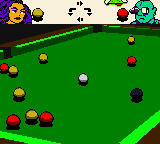
When you first boot up 3D Pocket Pool, you'll likely see a menu asking you to choose game mode. Options typically include practice, single-player against the computer, or two-player hot-seat matches. The interface is menu-driven; use the D-pad to navigate and the A button to confirm your choice. Once you pick a mode, you'll see the pool table from an angled overhead view. The game will ask you to break - aim the cue ball by moving the on-screen crosshair, then hold the A button to fill a power meter and release to shoot. The trick is to hit the racked balls squarely to scatter them.
The core loop is standard eight-ball or nine-ball: pocket all your designated balls (stripes or solids) and then sink the 8-ball to win. The computer opponent takes turns automatically after you miss, so you need to think about defensive shots too. Power control is crucial - too hard and your cue ball might scratch (pocket itself), ending your turn. The game uses a simple aiming line to show where the cue ball will travel, but it doesn't show bank shots or spin effects. Focus on precision rather than power.
If you are playing two-player, pass the Game Boy Color back and forth after each shot. The game keeps track of fouls and turn order. There is no deep career mode or unlockables - just quick matches. For newcomers, start with practice mode to get a feel for the aiming and power system before facing the AI. The menus are in multiple European languages; choose your language in the options before starting a game.
CONTROLS
Controls
- Arrow Keys: D-Pad / Movement
- X: A button (jump / confirm)
- S: B button (run / attack / cancel)
- Enter: Start / Pause
- V: Select
3D Pocket Pool FAQ
Who developed 3D Pocket Pool?
The developer of 3D Pocket Pool is not widely documented. No specific studio or individual is commonly credited for this Game Boy Color release.
What makes 3D Pocket Pool stand out among Game Boy Color titles of its era?
It attempts a pseudo-3D perspective for the pool table, which was an unusual visual approach on the GBC. The inclusion of five European languages also made it accessible across multiple regions without separate cartridges.
Is 3D Pocket Pool considered easy to pick up or challenging?
It is fairly easy to pick up because the controls are simple and the rules follow standard pool. The challenge comes from the computer AI's decent shot accuracy and the need to plan several shots ahead to win consistently.
You may also like
All Game Boy Color games











GAME INFO
- Platform
- Game Boy Color
- Genre
- Sports
- Released
- 2001
- Region
- Europe
COMMENTS (0)
No comments yet. Be the first to share your thoughts.