The game loads when you press Play · press “Play Now” inside the game if it asks.
Volleyball (Japan)
Volleyball
Volleyball - Sports Classic
- Famicom Disk System
- Sports
- 5· 0 votes
GAME INFO
- Platform
- Famicom Disk System
- Genre
- Sports
- Publisher
- Nintendo
- Developer
- Nintendo Research & Development 1
- Released
- 1986
- Players
- 1-2
- Region
- Japan
How to play Volleyball online
Getting Started
When you start Volleyball, you will see a title screen followed by a menu. Since this is the Japanese FDS release, menus are displayed in Japanese. The options typically allow you to choose a game mode (such as 1-player vs computer or 2-player versus) and adjust settings like game length. Navigate using the D-Pad and confirm with the A button (X key). Select with the B button (S key) to cancel or go back.
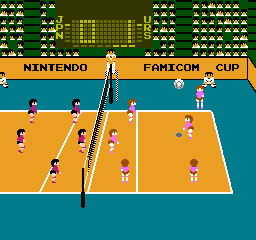
The core loop is standard volleyball. You control a team of players on a court. Serve by pressing the attack button at the right moment, then move your players to position for a pass, set, and spike. The opposing team will try to block or dig your attacks. On defense, you must react quickly to return the ball. The game follows basic volleyball rules: points are scored when the ball lands in the opponent's court or they commit a fault.
Mastering timing for serves and spikes is essential. The jump mechanic (A button) lets you reach high balls for a spike or block. The game does not have complex button combinations; it relies on positioning and timing. If you are new to retro sports games, start with a short match to get a feel for the pace. The computer opponent provides a fair challenge for beginners.
CONTROLS
Controls
- Arrow Keys: D-Pad / Movement
- X: A button (jump / confirm)
- S: B button (run / attack / cancel)
- Enter: Start / Pause
- V: Select
Volleyball FAQ
What type of game is Volleyball?
Volleyball is a sports simulation that recreates the rules and flow of a real volleyball match. Players control a team and perform serves, passes, sets, and spikes to score points against the opponent.
Which regions was Volleyball released in?
Volleyball first released in Japan for the Famicom Disk System in 1986. It later came to North America and Europe for the NES in 1987.
Who developed Volleyball?
Volleyball was co-developed by Nintendo and Pax Softnica. Pax Softnica had previously created the MSX game Attack Four, which served as the foundation for this title.
You may also like
All Famicom Disk System games Aki to Tsukasa no Fushigi no Kabe
 Yume Koujou - Doki Doki Panic
 Bishoujo Hanafuda Club Vol.2 - Koikoi Bakappana Hen
 Bishoujo Shashinkan - Studio Cut
 Bishoujo Sexy Slot
 Bishoujo Hanafuda Club Vol.1 - Oichokabu Hen
 Transformers - The Headmasters
 Bakutoushi Patton-kun
 Aliens - Alien 2
 Tenshitachi no Houkago
 Backgammon
 Chitei Tairiku Ordola
GAME INFO
- Platform
- Famicom Disk System
- Genre
- Sports
- Publisher
- Nintendo
- Developer
- Nintendo Research & Development 1
- Released
- 1986
- Players
- 1-2
- Region
- Japan
COMMENTS (0)
No comments yet. Be the first to share your thoughts.