The game loads when you press Play · press “Play Now” inside the game if it asks.
Tennis (Japan)
Tennis
Tennis: FDS Sports
- Famicom Disk System
- Sports
- ROM Hack
- 5· 0 votes
Unofficial ROM hack. The notes below come from community sources and have not been verified against the patch itself, so levels, mechanics and features may differ from what is described.
GAME INFO
- Platform
- Famicom Disk System
- Genre
- Sports
- Players
- 1-2
- Region
- Japan
- Based on
- Tennis (NES)
How to play Tennis online
Getting Started
When you boot the game, you'll see a title screen with menu options. Use the D-Pad to move between choices and press X (A button) to confirm. If you're playing alone, select single-player mode to face an AI opponent. For a two-player match, pick the two-player option. The game uses Japanese text, but the menu layout is simple enough to navigate by trial: the top option is usually single-player, the second is two-player.
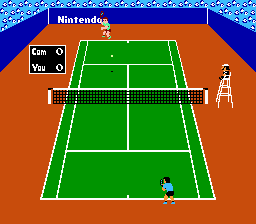
Once the match begins, you control your player with the D-Pad. Move left or right to position yourself. When the ball comes toward you, press the A button (X key) to swing. Timing matters: swing too early or late and you'll miss or hit a weak return. The B button (S key) can be used for a more powerful shot, but it requires charge time. Watch the ball's shadow to judge where it will land.
The core loop is serving first, then rallying. Serving is done by pressing A; you can control the direction of your serve by pressing left or right on the D-Pad during the toss. The first player to win six games (with at least a two-game lead) takes the set. If the score reaches 6-6, a tiebreak is played. It's a straight port of the original NES game, so the physics are simple and the pace is slower than modern tennis games. Practice your timing to master the basic strokes.
CONTROLS
Controls
- Arrow Keys: D-Pad / Movement
- X: A button (jump / confirm)
- S: B button (run / attack / cancel)
- Enter: Start / Pause
- V: Select
Tennis FAQ
What makes Tennis stand out among Famicom Disk System titles of its era?
It is one of the earliest tennis games on a Nintendo console, offering a clean simulation of real tennis rules with no power-ups or gimmicks. The FDS conversion preserves that straightforward design, making it a pure sports experience that stands apart from more arcade-style titles.
Is there anything iconic or memorable about Tennis?
The game is remembered as a launch title for the NES in North America and for its role in popularizing sports games on Nintendo hardware. Its minimal presentation and solid tennis mechanics have made it a nostalgic favorite among retro gamers.
Is Tennis exclusive to Famicom Disk System or did it appear on other systems?
No, Tennis originally released on Famicom cartridge and later on NES in other regions. It also appeared on the Game Boy in 1989 and as an arcade version called VS. Tennis. This FDS version is a conversion of the original Famicom game.
You may also like
All Famicom Disk System games Aki to Tsukasa no Fushigi no Kabe
 Yume Koujou - Doki Doki Panic
 Bishoujo Hanafuda Club Vol.2 - Koikoi Bakappana Hen
 Bishoujo Shashinkan - Studio Cut
 Bishoujo Sexy Slot
 Bishoujo Hanafuda Club Vol.1 - Oichokabu Hen
 Transformers - The Headmasters
 Bakutoushi Patton-kun
 Aliens - Alien 2
 Tenshitachi no Houkago
 Backgammon
 Chitei Tairiku Ordola
GAME INFO
- Platform
- Famicom Disk System
- Genre
- Sports
- Players
- 1-2
- Region
- Japan
- Based on
- Tennis (NES)
COMMENTS (0)
No comments yet. Be the first to share your thoughts.